
YouTube RPM Explained: CPM vs RPM and Rates by Niche
YouTube RPM explained in plain terms: how it differs from CPM, what moves it, and realistic RPM ranges by niche in 2026.
Key Takeaways
- RPM already has YouTube’s cut removed. A $20 CPM does not mean $20 per 1,000 views — the platform keeps roughly 45% of watch-page ad revenue before RPM is even calculated.
- The 55/45 split is fixed in YouTube’s own Partner Program terms — 55% to the creator — and it does not change with channel size or negotiating leverage.
- Niche sets a ceiling, not a guarantee: cross-checked trackers put finance and B2B RPM as high as $15–$35, gaming and general entertainment as low as $1–$5.
- Geography alone can swing RPM 5x on the very same channel — one creator’s own dashboard showed $4.87 on a Philippines-heavy travel video versus $24.70 on a US-heavy one, same month, same channel.
- Q4 advertiser spending lifts RPM across almost every niche; January resets it. Budget for a real dip, not a fixed percentage — estimates range from 20% to 50%+ depending on the source and the niche.
Two creators post the same week. One clears $40 for 10,000 views. The other clears $400 for the same 10,000 views. Nothing about the upload schedule, thumbnail, or watch time explains the gap — the gap is YouTube RPM, and neither creator can see the other’s to know why. Revenue per mille is the number YouTube Studio actually pays against, and it is a different number from the CPM figure that gets thrown around in every “how much does YouTube pay” video — different enough that mixing the two up is the single most common reason a creator’s own math never matches their bank deposit.
This page is the mechanics: what RPM actually is, why it is always lower than CPM, what moves it up or down, and what a realistic range looks like by niche in 2026. For the ranked list of which niches to actually build a channel around, see the best faceless YouTube niches, ranked by RPM — this page explains the number, that one ranks the categories.
YouTube RPM mechanics, verified against official sources and creator dashboards
55%
Creator's share of long-form watch-page ad revenue
8 min
Minimum video length to unlock mid-roll ad breaks
$4.87 vs $24.70
Same channel, same month — RPM by audience geography
20–50%
Typical RPM dip from Q4 peak into January
Sources: YouTube Partner Program earnings overview · How Much YouTube Pays for 1,000 Subs — vidIQ
CPM vs RPM: the number advertisers pay vs the number you get
YouTube’s own help center defines the two plainly, and the distinction is the whole ballgame. CPM (cost per mille) is what an advertiser pays YouTube for 1,000 ad impressions — it’s an advertiser-side number, and it never touches your account directly. RPM (revenue per mille) is what you actually earn per 1,000 views — not impressions — after YouTube’s revenue share is deducted, and it rolls in every income source on the video, not just ads: channel memberships, YouTube Premium watch-time revenue, Super Chat, and Super Stickers.
RPM is always lower than CPM, for two compounding reasons. First, the platform’s cut comes off the top. Second, RPM’s denominator is every view in the period, while CPM only counts views that actually served an ad — ad-blocked views, views with no advertiser demand to fill the slot, and YouTube Premium views (no ads shown, but the video still earns a cut of the subscription based on watch time) all dilute RPM without ever generating a CPM.
Where the money actually goes
vidIQ’s Adam Cameron walks through this with a clean example: say an advertiser pays $100 to put an ad on your video. Deliberately round, deliberately not realistic — it’s a teaching number. That $100 is the CPM. YouTube keeps roughly 45% of it; you get the other 55%, or $55. “Cost per mille, revenue per mille,” as he puts it — same transaction, two different numbers depending on which side of it you’re standing on.
1. Advertiser bids
$100
CPM — what an advertiser pays YouTube per 1,000 ad impressions on your video. ($100 is a round teaching number, not a typical rate.)
2. YouTube's cut
−45%
YouTube's share of watch-page ad revenue under the Partner Program terms. Fixed. Same split for a 1,000-subscriber channel and the biggest creator on the platform.
3. Creator's share
$55
The 55% YouTube actually pays out on that same $100 — the number the Partner Program terms guarantee, before anything else touches it.
4. What RPM shows
revenue ÷ views
That $55 gets divided across every view in the period — ad-blocked, no-fill, and YouTube Premium views included — which is why the RPM in your dashboard always lands below the per-ad number.
The step most explainers skip is the fourth one. That $55 isn’t what shows up as your RPM — it gets divided across every view in the period, including the ones that never generated a dollar. A channel with heavy ad-blocker usage, a large YouTube Premium audience, or markets where advertiser demand doesn’t fill every slot will show an RPM meaningfully below that 55%, on the exact same content.
The split doesn't move
YouTube states the 55/45 revenue share applies uniformly under the Partner Program — no tier, size, or negotiated exception. A 1,000-subscriber channel and the largest channel on the platform split watch-page ad revenue on the identical 55/45 line. Shorts Feed ads use a separate 45%-to-creator formula based on the Creator Pool, which is a different mechanism entirely — see how long-form and Shorts RPM actually compare.What moves RPM: geography, ad demand, and audience
Niche sets the ceiling (more on that below), but geography decides how close a given video gets to it — and it can move the number more than niche does. Advertisers bid on purchasing power, not passion. TubeAnalytics’ benchmark data puts average RPM at roughly $4.20 in the US, $3.30 in the UK, and $0.75 in India for comparable content — a roughly 5–6x spread on audience location alone, before niche or format enter the picture.
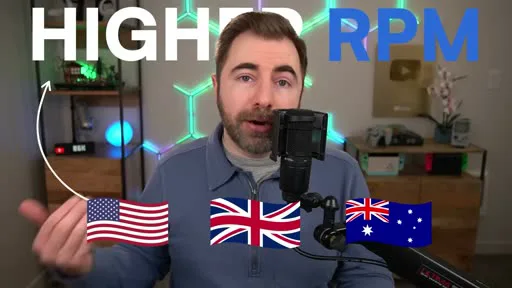
The same effect shows up inside a single channel. In the vidIQ breakdown above, one travel creator posted two videos in the same window: a video about Coron in the Philippines ran a $4.87 RPM, while an Inca Trail / Machu Picchu video — same channel, similar views — ran $24.70. “That’s not a coincidence,” the video notes; audiences drawn to the second destination skew toward US, UK, and Australian viewers, and advertisers pay more to reach them. A channel chasing a global audience for reach will average down its own RPM even as total revenue climbs — which is the right trade for most channels, just one worth knowing you’re making.
Seasonality: the swing that has nothing to do with your content
RPM moves on a calendar that has nothing to do with upload schedule. Advertisers spend down annual budgets in Q4 chasing holiday shoppers, then those budgets reset to zero on January 1st. The size of the swing is where sources genuinely disagree — OutlierKit reports CPMs “doubling or tripling” in November and December versus the yearly average, then dropping “50% or more” in the first two weeks of January; other trackers put the December-to-January dip closer to 20–30%. The honest answer is a range, not a number: expect a real drop, expect it to be somewhere between one-fifth and one-half of your Q4 rate, and don’t read it as your channel losing momentum.
“If you’re going to start your channel, try and get it started like now... so that by December time, you can put out your Christmas content, and you can see that step up. That bump is a real thing basically for every niche on YouTube.”
— How Much YouTube Pays for 1,000 Subs, vidIQ
Don't panic in January
A 20–40% RPM drop in the first weeks of January is normal seasonal resetting, not a sign your channel or your last upload did something wrong. Compare January to last January, not to December.Video length and ad formats
Length changes RPM through one hard gate: YouTube requires a video to run at least 8 minutes before mid-roll ad breaks become available at all. Below that threshold, a video can only carry a pre-roll and a post-roll — two ad opportunities, maximum. At 8 minutes and up, you can add manual mid-roll slots at natural breakpoints, let YouTube’s system place them automatically, or combine both. More slots is not automatically better — YouTube’s own guidance is that ad placement weighs “viewer experience, creator earnings, and advertiser values” together, and a video interrupted too often loses the retention that RPM depends on in the first place.
This is where a lot of channels leave money on the table without realizing it: publishing consistently at 5–7 minutes because that’s what the script came out to, never crossing the threshold that unlocks a second and third ad slot on the same upload. Longform Studio’s pipeline is built around 8–30 minute narrated videos specifically — research, script, and measured ElevenLabs narration timing all target a runtime that clears the mid-roll gate by design, rather than an editor discovering after the fact that a video landed at 6:40.
Realistic RPM ranges by niche
“What’s a good RPM” only has an honest answer in tiers, because per-niche numbers vary by several dollars depending on which tracker you read — vidIQ’s own blog puts finance at $5–$17 RPM, OutlierKit puts it closer to $10–$15, TubeAnalytics as high as $8–$35. Rather than pick one flattering figure, here’s how those trackers cluster once you group niches by what advertisers are actually bidding on: purchase intent.
| Tier | Typical RPM | What's driving the price | Example niches |
|---|---|---|---|
| Top-of-market | $15–$35+ | Advertiser sees a single conversion worth hundreds or thousands of dollars | Personal finance, B2B/SaaS, legal |
| Strong | $8–$20 | Real ad budgets and competitive bidding, lower per-view purchase intent | Business, technology, real estate, health |
| Solid | $5–$12 | Steady advertiser demand, broad but not premium audience | Education, filmmaking/photography, parenting |
| Modest | $3–$8 | Engaged viewers, but a lower-value vertical for most advertisers | True crime, travel, DIY & how-to |
| Volume-only | $1–$5 | Huge reach, low purchase intent — advertisers bid pennies per impression | Gaming, general entertainment, vlogs |
Two things carry across every one of these trackers. Purchase intent beats audience size every time — a smaller finance channel will usually out-earn a much larger gaming channel per view. And every tier here is a range, not a promise: the same niche can land at either end depending on the geography and seasonality factors above. The full ranked breakdown of individual niches, competition level, and how well each fits an AI production pipeline is in the niche ranking linked above.
Reading RPM in YouTube Studio
RPM and CPM both live in YouTube Studio’s Revenue tab — Analytics → Revenue. The channel-level number is an average across every monetized video in the selected date range; click into an individual video and its Revenue tab shows that video’s own RPM, CPM, and playback-based CPM side by side, along with a breakdown of which revenue source (ads, Premium, memberships) contributed what.
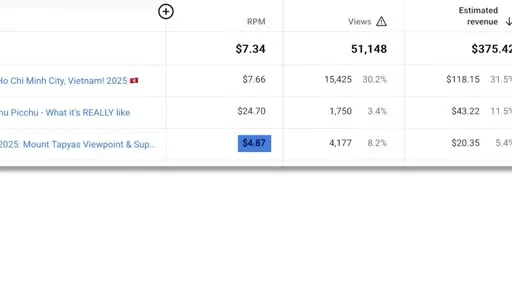
Two habits make that table useful instead of confusing. Compare RPM against your own channel’s history and one genuinely comparable competitor, not against a published industry average — TubeAnalytics’ framing is the right one here: “a good RPM beats your own baseline and stays stable across several uploads.” And read RPM per video, not only the channel rollup — a single video with an unusual audience mix or a seasonal spike can move the channel average enough to hide what every other video actually did.
FAQ
What is a good YouTube RPM?
There's no universal number — a good RPM beats your own channel's baseline and stays stable across several uploads, not a fixed industry figure. As a rough anchor, $1–$5 is normal for broad entertainment and gaming, $5–$12 for solid mid-tier niches like education or parenting, and $15 and up is realistic for high-intent verticals like personal finance or B2B — but geography and season shift every one of those ranges by several dollars.
What's the difference between CPM and RPM on YouTube?
CPM is what an advertiser pays YouTube per 1,000 ad impressions — it never touches your account directly. RPM is what you actually earn per 1,000 views, after YouTube's revenue share is deducted and after non-ad income (Premium watch time, memberships, Super Chat) is folded in. RPM is always the lower number, and it's the one that matches your actual payout.
Why is my RPM so much lower than my CPM?
Two compounding reasons: YouTube keeps roughly 45% of watch-page ad revenue before RPM is calculated, and RPM's denominator counts every view in the period — including ad-blocked views, no-fill views, and YouTube Premium views that never generated a CPM in the first place.
Does video length affect RPM on YouTube?
Indirectly but significantly. Videos need to run at least 8 minutes to unlock mid-roll ad breaks; below that, only pre-roll and post-roll ads are available. More ad opportunities on a longer video generally lifts RPM, but only up to the point where extra breaks start hurting retention — YouTube's own guidance weighs viewer experience against ad slots for exactly this reason.
Why did my RPM drop in January?
Seasonal advertiser budget resets, not a channel problem. Q4 (November–December) sees advertisers spend down their remaining annual budgets on holiday campaigns, then those budgets reset to zero on January 1st. Estimates for the resulting dip range from 20% to 50%+ depending on niche and source — compare January to last January rather than to December.
None of this is guesswork you have to do alone. If the RPM math above makes the case for a specific niche or a longer runtime, starting a faceless YouTube channel the right way — and clearing the actual monetization requirements first — matters more than chasing this month’s highest-RPM niche. And once a channel is earning, the views side of the equation is worth the same rigor as the rate side; see how many views it actually takes to get paid for the worked math on turning an RPM range into a real number.
Runtime is an RPM decision. Make it on purpose.
Longform Studio scripts, storyboards, and narrates 8–30 minute videos by design — the runtime that clears the mid-roll ad threshold instead of missing it by 90 seconds. Research, script, AI stills, ElevenLabs narration, and a synced render, all built for the length that actually moves your RPM.
Try Longform Studio$49/mo plus transparent per-dollar production costs — no markup on provider usage.