
AI Tools for a Faceless YouTube Channel: The Full Stack
Every AI tool a faceless YouTube channel needs, stage by stage, with real 2026 pricing tallied as you go — and what the DIY stack actually costs per month.
Key Takeaways
- The full DIY stack lands around $133/month across seven subscriptions — the stage-by-stage tally below shows exactly where it goes.
- Voice (ElevenLabs Creator, $22/mo) and visuals (Midjourney Standard, $30/mo) are the two priciest, most usage-metered stages — both are billed by output, not by seat.
- The cheapest possible build on entry-tier plans runs $60–$90/month, but a single heavily-regenerated 15-minute video can blow through those credit ceilings before the edit even starts.
- None of the seven tools know about each other: change one sentence in the script and the usual fix is regenerating the whole video, not the one scene that actually changed.
- Tools change production cost, not the monetization bar — 1,000 subscribers and 4,000 watch hours in 12 months applies the same whether a video was AI-assisted or hand-shot.
Open six tabs, and by the end of one video you've paid four different companies for four different trials. That's the real starting point for anyone assembling AI tools for a faceless YouTube channel in 2026: not “which tool is best,” but “how many subscriptions does one 15-minute video actually require, and what does that add up to by the time it's live.”
The honest answer is five to seven tools across seven production stages, most billed monthly whether you use them or not. Below is that stack, stage by stage, with current pricing tallied as you go, so the total is visible instead of buried across seven separate checkout pages.
For a stage-by-stage look at the same seven-part pipeline this article walks through, All About Money (~81K subscribers) records a full build end to end: ChatGPT for the channel name and script, ElevenLabs for narration, Leonardo AI for scene images, Canva for the thumbnail, and RapidTags.io for upload tags. It's a useful comparison point precisely because it leans on free tiers where this article prices the paid ones — Leonardo AI instead of Midjourney, RapidTags.io instead of TubeBuddy or VidIQ — which is the cheap-stack path the FAQ below covers, credit ceilings and all.
The stack, stage by stage
Research: the stage most faceless AI YouTube channel stacks skip
Every generic “AI YouTube automation” guide starts at scripting. That's backwards. A script without sourced facts is how you end up with a video confidently narrating something that isn't true — which is also how channels lose the trust that gets a video watched to the end.
For research, most creators use a general-purpose AI chat tool: ChatGPT Plus is $20/month, and gets you longer context windows and deep research features useful for pulling together facts, dates, and figures from multiple sources before a script gets written. Some creators substitute Grok or Gemini at similar price points. None of these tools cite their sources reliably enough to trust unchecked — you still have to open the links and verify claims by hand, which is the part that eats time, not the writing.
Running total: $20/month.
Scripting: where most faceless AI YouTube channels actually fail
A script is the single highest-leverage document in the whole pipeline — it determines pacing, retention, and whether the video says anything worth watching. Generic AI script generators produce serviceable but generic prose: correct facts, flat delivery, the same rhythm every video. Fixing that means going back into the same tool for sentence-level edits, over and over, across a 2,000-word script.
That's the actual workflow cost people leave out of AI-for-YouTube-videos comparisons: not the subscription price, but the hours spent re-prompting a chat window one paragraph at a time because there's no way to select a sentence, note “cut this,” and move on.
If ChatGPT Plus is already covering research, scripting adds no new subscription — but it does add the hidden cost of manual editing. That's a workflow gap worth naming now, because it comes back later.
Voice: the one stage where “AI” now beats a mic for most solo creators
Narration is where AI has genuinely closed the gap with a human voice actor, and pricing here is granular because it's metered by usage, not a flat seat.
ElevenLabs prices in credits, roughly one credit per character generated:
| Plan | Price | Monthly credits | Roughly |
|---|---|---|---|
| Free | $0 | 10,000 | ~10 minutes |
| Starter | $6/mo | 30,000 | ~30 minutes |
| Creator | $22/mo | 121,000 | ~121 minutes |
| Pro | $99/mo | 600,000 | ~600 minutes |
A 15-minute narrated video runs roughly 2,000–2,500 spoken words, which is close to the ceiling of what the Starter plan covers in a single video — most channels publishing weekly land on Creator at $22/month to have headroom for retakes and multiple videos.
Running total: $42/month ($20 research/scripting + $22 voice).
Visuals: the most expensive and most inconsistent stage
This is where a faceless AI YouTube channel spends the most money and loses the most time to rework. Image generators are priced by GPU compute, not by output, so a video with 40+ scene images can burn through a plan fast — and if a character's face or outfit drifts between scenes, the fix is regenerating, not editing.
Midjourney's current tiers: Basic $10/month (3.3 hours of fast GPU time), Standard $30/month (15 hours plus unlimited relaxed-mode generations), Pro $60/month (30 hours, private generations), Mega $120/month (60 hours). A 15-minute video with 30–50 distinct scene images, several of them regenerated for consistency or composition, comfortably burns through Basic in one project — most channels doing this weekly sit at Standard, $30/month.
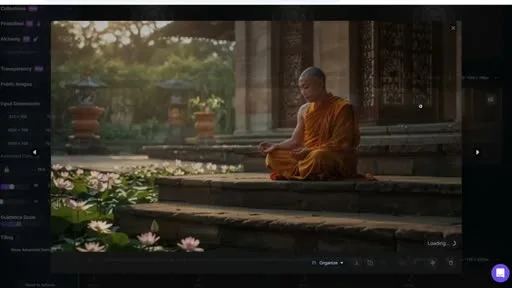
Leonardo AI is the free-tier alternative All About Money uses instead of Midjourney in the video above — same GPU-time-metered pricing model, cheaper entry tier, same drift problem once a scene needs regenerating for a consistent character.
Midjourney
Paid, GPU-hour metered
- Basic $10/mo — 3.3 hrs fast GPU time
- Standard $30/mo — 15 hrs + unlimited relaxed mode
- Pro $60/mo — 30 hrs, private generations
- Mega $120/mo — 60 hrs
Best for: Channels that need the highest fidelity and can absorb $30+/month for it.
Leonardo AI
Free-tier alternative — used by All About Money
- Free tier available
- Same GPU-time-metered pricing model as Midjourney
- Cheaper entry tier
- Same character-drift problem on regeneration
Best for: Channels leaning on free tiers to keep the visuals stage near $0.
Canva Pro, commonly layered in for thumbnail composition and simple graphic elements, runs about $18/month at list price (lower on annual billing, and Canva has moved this price twice in the past year, so check the current figure before budgeting).
Running total: $90/month ($42 + $30 image generation + $18 thumbnail/graphics tool).
Editing: assembling everything that was just generated
Once you have narration audio and a folder of AI-generated stills, something has to time them together, add captions, and export a finished cut. Descript is a common choice because it edits video by editing the transcript:
| Plan | Price | Media/month | AI credits |
|---|---|---|---|
| Free | $0 | 60 min | 100 |
| Hobbyist | $16/mo | 10 hrs | 400 |
| Creator | $24/mo | 30 hrs | 800 |
| Business | $50/mo | 40 hrs | 1,500 |
A weekly 15-minute channel needs the Creator tier to stay under the monthly media cap once you count re-edits and drafts: $24/month. CapCut is the cheaper alternative many creators use instead — Pro runs $19.99/month after CapCut's 2026 price restructuring (it was $7.99 as recently as late 2025), which is worth knowing if you priced it out a year ago and assumed the old number still holds.
Running total: $114/month ($90 + $24 editing).
Thumbnails and publishing: the stage that quietly adds two more subscriptions
Getting a video in front of people needs a compelling thumbnail and, for most channels, a tool to manage tags, titles, and upload scheduling. This is usually where the fifth and sixth subscriptions of the month show up.
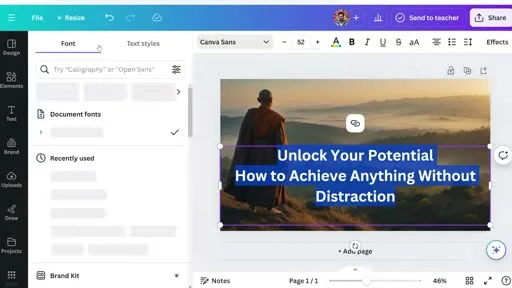
TubeBuddy's paid tiers start around $9/month (Pro) and climb to roughly $19/month (Star) for the keyword and thumbnail A/B-testing features most channels actually want. VidIQ's comparable tier, Boost, lands around $39/month on standard billing (cheaper if paid annually). Pick one, not both — they overlap almost completely — but budget for at least the lower of the two. The video above skips both and pulls tags from the free tool RapidTags.io instead — workable at zero subscriptions, but without the A/B-testing or keyword-tracking either paid tool adds over time.
TubeBuddy
Pro $9/mo → Star ~$19/mo
- Keyword research
- Thumbnail A/B testing
- Tag suggestions
Best for: Channels that want thumbnail A/B testing baked in.
VidIQ
Boost ~$39/mo standard billing
- Keyword + competitor tracking
- Overlaps almost entirely with TubeBuddy
- Cheaper on annual billing
Best for: Channels already using vidIQ's other growth tools.
RapidTags.io
Free — used by All About Money
- Free tag generation
- No A/B testing
- No keyword-tracking history
Best for: Cheap-stack builds willing to skip A/B testing entirely.
Running total: $123–$153/month, before counting the time spent stitching five to six tools' outputs together by hand, or the cost of the regenerate-everything mistake below.
The running total, laid out
| Stage | Tool (example) | Monthly cost |
|---|---|---|
| Research | ChatGPT Plus | $20 |
| Scripting | (same tool, manual sentence editing) | $0 + hours of manual work |
| Voice | ElevenLabs Creator | $22 |
| Visuals | Midjourney Standard | $30 |
| Thumbnails/graphics | Canva Pro | $18 |
| Editing | Descript Creator | $24 |
| Publishing/SEO | TubeBuddy Star | $19 |
| Total | 7 subscriptions | ~$133/month |
The DIY faceless-channel stack, tallied
7
Subscriptions across the full production pipeline
~$133
Blended monthly total for a weekly-cadence channel
$60–$90
Cheapest possible stack on entry-tier plans
$123–$153
Realistic range once a publishing/SEO tier is picked
Sources: ElevenLabs pricing · Descript pricing
The seam problem no subscription fixes
That's before the failure mode that actually costs the most: none of these tools know about each other. Change one sentence in the script and there's no signal to the image tool that a scene needs regenerating, no signal to the voice tool that timing shifted, no signal to the editor that the cut is now out of sync. The fix, in a disconnected stack, is usually “regenerate the whole video” — which on a per-image, per-minute-of-audio pricing model is real money spent redoing work that was already correct.This is the actual argument for an integrated studio over a DIY stack: not that any single tool in the list above is bad, but that the seams between them are where cost and time both leak. Longform Studio runs research, script editing, image generation with consistent characters, per-scene selective regeneration, ElevenLabs narration, and cloud rendering in one workspace, so changing one sentence regenerates one scene — not forty. Pricing is $49/month for the Creator plan plus production costs billed in actual dollars, visible per project, not abstracted into credits you have to convert back to guess what something cost.
Two policies worth checking before you publish
Monetization eligibility and AI-disclosure rules are separate from anything in the stack above. The YouTube Partner Program eligibility requirements apply the same 1,000-subscriber, 4,000-watch-hour bar whether a video was hand-shot or AI-assisted. And YouTube's AI disclosure policy only requires a label for realistic, photorealistic synthetic content — most faceless-channel visual styles are exempt.If you're deciding whether to stitch the seven-tool stack together yourself or start from something that already routes between stages, the guide on how to start a faceless YouTube channel covers the decision points before tooling — niche, format, upload cadence — that determine which stack actually fits. The breakdown of AI tools for YouTube automation goes deeper on the scheduling and publishing layer this article only touches at the end. And if the goal is specifically to reduce tool count rather than optimize each stage individually, best faceless AI video generators compares the all-in-one options directly against this kind of manual build.
FAQ
What's the cheapest AI tool stack for a faceless YouTube channel?
Realistically $60–$90/month if you stay on entry tiers: ChatGPT Plus ($20), ElevenLabs Starter ($6), Midjourney Basic ($10), CapCut Standard ($9.99), and free-tier thumbnail/SEO tools. The tradeoff is credit ceilings — a single 15-minute video with heavy regeneration can blow through Starter-tier image and voice limits before the video is even edited.
Do I need a separate tool for every production stage?
No, but each all-in-one gap you close manually costs time, not money — sentence-level script edits in a chat window, or hand-syncing regenerated images to existing audio. The question isn't whether you need seven tools; it's whether you'd rather pay in subscriptions or in hours spent gluing outputs together.
Can AI tools alone make a faceless YouTube channel profitable?
Tools lower production cost and time; they don't guarantee views, subscribers, or ad revenue. Monetization through the YouTube Partner Program still requires 1,000 subscribers and 4,000 public watch hours in the trailing 12 months, regardless of how the video was made — YouTube's eligibility requirements don't distinguish between AI-assisted and traditionally produced content.
Do I have to disclose that I used AI tools for my YouTube videos?
Only for realistic, photorealistic synthetic content — YouTube's policy requires disclosure when AI generates or meaningfully alters footage that could be mistaken for real events, places, or people. The policy explicitly exempts AI-generated scripts, thumbnails, captions, and non-realistic or animated visuals, which covers most faceless-channel image styles.
Is ElevenLabs the best AI voice tool for faceless YouTube videos?
It's the most widely used for narration quality and control over pacing, but it's priced by character count, not by video, so cost scales directly with script length. A weekly 15-minute channel needs at least the $22/month Creator tier to avoid running out of credits mid-month; heavier publishing schedules push toward the $99 Pro tier.
Your $133-a-month stack is one pipeline in seven pieces
This article priced the seams, not just the tools — $133/month and a regenerate-the-whole-video failure mode every time one sentence changes. Longform Studio runs research, script edits, consistent character images, ElevenLabs narration, and rendering in one workspace, so changing one sentence regenerates one scene.
Try Longform StudioPricing in dollars, not credits you have to convert back to guess what something cost.