
Long-Form AI Video Generator: Making 10–30 Minute Videos With AI
A long form AI video generator has to solve scene count, character consistency, and cost — problems clip tools like Sora and Veo were never built for.
Key Takeaways
- Sora, Veo, Kling, and Runway cap out at 8–25 seconds per generation — a 20-minute video needs 250–400 of those calls chained by hand.
- A 20-minute narrated video is roughly 300 individual scenes and 2,800–3,500 words of narration, not one longer clip.
- Character consistency across separate clip generations is “disqualifying,” not cosmetic, once a subject has to read the same in scene 12 and scene 280.
- A scene-to-script mapping turns a four-sentence rewrite into a $2 fix instead of a $40 re-render of the whole episode.
A 20-minute YouTube video is not a long clip. It’s roughly 300 individual visual scenes, one narrator voice held steady for 3,000+ words, and a script that has to survive edits without a full re-shoot. Type that brief into Sora, Veo, or Runway and you’ll hit a wall in the first ten seconds — because those tools cap out at 8 to 25 seconds per generation. A long form AI video generator has to be a different kind of system entirely, not a clip tool with a longer timer.
That gap is why most “AI video generator” content on YouTube is still short-form: 30-second product demos, meme clips, social cuts. The generators are built for exactly that duration. Building a 15-minute narrated documentary or a 25-minute explainer requires solving four problems that a single text-to-video call cannot touch, no matter how good the model gets at rendering eight seconds of footage.
Why clip generators can’t do long-form
Clip generator caps, per single generation — 2026
25s
Sora 2 Pro (15s on the standard tier)
8s
Veo 3 / 3.1 — every generation, no exceptions
10s
Kling per clip (3 min max with paid Extend)
60s
Runway Gen-4.5 — the most generous of the four
Sources: Runway pricing
Sora 2 tops out at 25 seconds on a Pro plan and 15 seconds for everyone else, with Standard limited to 4, 8, or 12-second clips. Veo 3 and Veo 3.1 cap every single generation at 8 seconds — 4, 6, or 8 is the entire menu, whether you’re in Google Flow, the Gemini app, or the Vertex AI API. Kling caps a single clip at 10 seconds, and even its Extend feature — a paid-tier-only workaround — tops out at 3 minutes total. Runway’s Gen-4.5 is the most generous of the group at up to 60 seconds of continuous generation, but its credit system still prices a 20-minute video at hundreds of dollars in credits, assembled from dozens of separate, disconnected generations.
Not a bug — it's the architecture
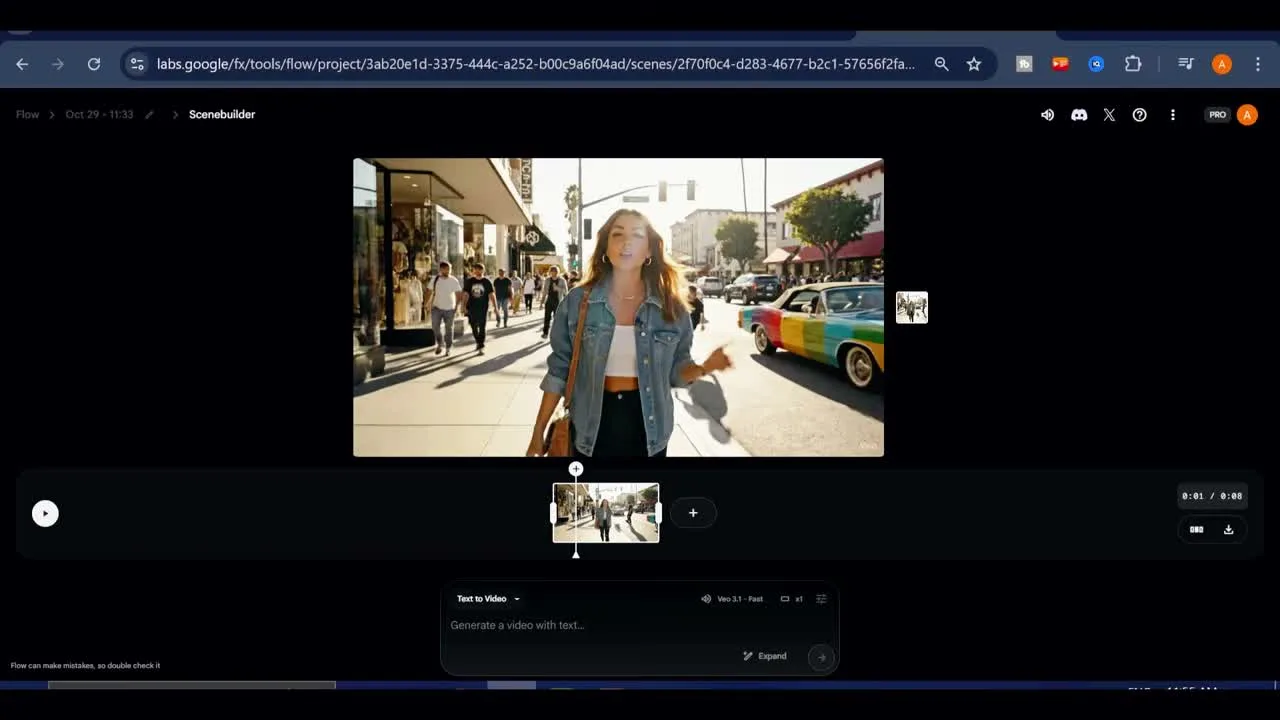
Diffusion-based video models generate a fixed window of frames per call because holding coherent motion and lighting across longer spans compounds errors fast — which is also why every one of them recommends the same workaround: generate short clips, then stitch them in an editor. That workaround is a full production pipeline by another name. It just isn’t packaged as one.What that workaround actually looks like in practice is worth watching, not just describing. AI PIPELINE (~17K subscribers) walks through it step by step in How to Finally Make Long Videos with VEO 3.1, using Google Flow’s Scene Builder — the tool Google ships specifically to chain Veo clips together.
Every generation in Flow is capped at 8 seconds. To go longer, the creator has to chain clips together by hand, one scene at a time, watching for drift between each:
Drag the playhead to the end of the last clip.
Paste in the next prompt by hand and generate — every call capped at 8 seconds, the interface literally reading “0:01 / 0:08.”
Watch for drift between generations — “the same dress, the same face, the same overall look.”
When a generation comes out wrong, delete the scene and regenerate until you’re satisfied — there’s no way to patch just the broken part.
Repeat, scene by scene. After five separate generations chained this way, the result is “over 30 seconds long.”
Five manual extensions, five consistency checks, five possible do-overs — for well under a minute of finished footage. That’s the actual throughput of the clip-chaining workaround, and it’s the gap a 20-minute, 300-scene video would have to close by hand.
A long form AI video generator for YouTube has to actually be that pipeline: research, script, hundreds of still or motion scenes, narration, timing, and render, held together as one project you can revise. Below is what each sub-problem looks like and how a real long-form system solves it.
The four problems long-form actually presents
Scene volume: 300+ shots, not one shot
250–400 scenes per 20-minute episode
- Script treated as the source of truth
- Shot list derived automatically from the script
- One scene per narration beat, not a guessed duration
- No manual chaining of hundreds of API calls
Best for: Episodes where the visual changes every 3–5 seconds of narration.
Character and world consistency
Same subject, scene 12 through scene 280
- Reference image locked once per character or style
- Every later scene generated against that same reference
- No fresh, unanchored prompt per scene
- Continuity discipline borrowed from storyboard artists
Best for: Any video where a narrator persona or character has to read as the same subject twice.
Narration sync at 3,000+ words
2,800–3,500 words at a natural pace
- Narration generated first, or in parallel with visuals
- Actual spoken duration measured per sentence
- Scene length driven by that measurement
- No manual cut-audio-to-fit in a separate editor
Best for: Scripts where every scene has to land on a specific sentence, not an arbitrary duration.
Cost and revision without regenerating everything
A $2 fix instead of a $40 re-render
- Scene-to-script mapping tracked per project
- Editing one sentence flags only the scenes tied to it
- The other ~296 scenes stay untouched and unbilled
- No full re-render for a four-sentence rewrite
Best for: Anyone making videos every week, where 'safe to iterate' matters more than one frame's photorealism.
Say the script’s second act is weak and you rewrite four sentences. In a clip-generator workflow, there’s no way to touch four sentences’ worth of footage without re-running the whole chain of prompts that came after it — because nothing tracked which generation depended on which script line. You either eat the cost of a full re-render or you hand-patch the edit in post, which is exactly the “editing eight tools stitched together” problem creators already complain about.
Clip generators vs. long-form production systems
| Clip generators (Sora, Veo, Runway, Kling) | Long-form production system | |
|---|---|---|
| Max single output | 8–25 seconds (Veo 8s; Sora Pro 25s; Kling 10s/clip; Runway ~60s) | No cap — driven by script length |
| Scene count handling | One prompt, one clip, manual chaining | Full shot list generated from the script automatically |
| Character consistency | Not guaranteed across separate generations | Reference-locked across every scene |
| Narration | Not part of the tool; cut in a separate editor | Sentence-level timing drives scene duration |
| Revising one line | Re-run the affected clip chain by hand | Regenerate only the scenes tied to that sentence |
| Cost model | Per-second credits, opaque at scale | Transparent per-project dollar cost |
| Output | Raw clips to assemble yourself | Rendered, synced master file |
This is why “best long form ai video generator” and “AI video generator for YouTube” are really different questions than “best AI video generator.” The clip tools above are genuinely strong at what they do — Veo 3’s audio-synced motion and Sora’s physical coherence are both real advances — but “what they do” is an 8-second shot, not an episode. Comparing them to a long-form system on video quality per second misses the actual constraint, which is holding 300 shots together into one coherent, revisable, affordably priced piece.
Where this leaves someone building a channel
If the plan is one 30-second hook video a day, a clip generator is the right tool and a long-form system is overkill. If the plan is a narrated 10–25 minute video — explainer, documentary-style, story-driven, the format YouTube rewards with mid-roll ad eligibility from the 8-minute mark — per week, the clip-chaining workaround becomes the actual bottleneck within a month: hours spent stitching, no character consistency across scenes, and a full re-render every time a line changes.
Over 30 seconds long — the result of five separate Veo generations, chained together by hand, for what would be a single beat in a 20-minute episode.
— AI PIPELINE, in the video's own words
Longform Studio was built around that second case specifically, not as a general video generator. It’s an agent-directed workspace for exactly this pipeline: source-backed research feeding the script, sentence-level script editing, a visual storyboard, still-image generation with consistent characters held across the whole episode, per-scene selective regeneration when one sentence changes, ElevenLabs narration measured against the actual script timing, a synced preview, and cloud rendering to a downloadable master — with the production record (sources, costs) kept alongside it. It costs $49/month for the Creator plan plus the actual dollar cost of what gets generated, shown as a real number rather than an opaque credit balance.
None of that replaces good research or a script worth watching — see the guide on how to start a faceless YouTube channel for the parts of this that are still entirely on the creator. But the mechanical problem — turning a finished script into 300 consistent, narrated, revisable scenes without burning a weekend on manual stitching — is the specific thing a long-form production system exists to solve, and it’s worth understanding the difference before picking a tool. For a broader look at the category, see the best faceless AI video generators, or start directly from the Longform Studio homepage.
If you’re deciding what format to build around in the first place, how to make a long-form video on YouTube and how to make YouTube videos with AI cover the planning side; the YouTube script generator piece covers the step that has to happen before any of this production tooling matters at all.
FAQ
What is a long form AI video generator?
It's a production system — not a single text-to-video model — that turns a full script into a complete narrated video: research, scene-by-scene visual generation with consistent characters, narration timed to the script, and a rendered master. Clip generators like Sora or Veo produce 8–25 second outputs and were not built to chain hundreds of them into one coherent episode.
Can Sora, Veo, or Runway make a 20-minute video?
Not in one step. Veo caps at 8 seconds per generation, Sora Pro at 25 seconds, Kling at 10 seconds per clip, and Runway's Gen-4.5 at roughly 60 seconds of continuous output. A 20-minute video needs 250–400 of those calls chained together manually, with no built-in way to keep characters or lighting consistent between them.
Why does character consistency break down in AI-generated long videos?
Most clip generators treat every generation as an independent prompt, so a character described the same way twice can come out with a different face, outfit, or setting each time. Long-form systems solve this by locking a reference image once and generating every subsequent scene against that same reference, rather than re-describing the character from scratch each time.
How much does it cost to make a 20-minute AI video?
It depends heavily on the tool and resolution, but clip-generator pricing runs $0.10–$0.70 per second of raw footage before any editing time is counted — meaning a fully clip-generated 20-minute video easily runs into the hundreds of dollars in raw generation cost alone, before accounting for the manual stitching work. A long-form system that generates still scenes rather than continuous video, and only regenerates what changed, brings that down substantially because it isn't paying per-second video rates for every frame.
Is InVideo a true long form AI video generator?
InVideo AI markets one-prompt videos up to 30 minutes, but independent reviews describe the output as needing real cleanup — generic pacing and visuals unless the script, captions, and brand details are manually refined afterward. It's closer to a fast draft generator built on template assembly than a production system with per-scene editing and consistent characters throughout.
You shouldn't have to storyboard 300 scenes by hand
This article walked through what it takes to turn a script into 300 consistent, narrated scenes without hand-chaining clip generations for a weekend. Longform Studio is that pipeline — script to shot list to reference-locked scenes to synced render, with per-scene regeneration when a line changes.
Start with Longform Studio$49/month plus real generation cost — no opaque credit balance.