
Best Faceless AI Video Generators in 2026 (Long-Form Edition)
Most roundups test a 60-second clip. Here's how 6 faceless AI video generator tools actually hold up on 15+ minute long-form YouTube videos.
Most “best faceless AI video generator” roundups are written from a 45-second demo clip. The writer types a prompt, watches a nine-second render, and ranks the tool on how good that one clip looked. That tells you nothing about what happens when you ask the same tool for a 15-minute video — which is the format that actually earns YouTube Partner Program revenue, since mid-roll ads only unlock at the 8-minute mark, per YouTube's own help documentation.
This roundup only tests long-form. Every tool below was evaluated on five criteria that only show up once you're past minute five: how long a video it can actually produce in one piece, whether you can fix one scene without re-rendering the whole thing, whether a character or visual style holds together across dozens of shots, whether the pricing page tells you what a video costs before you make it, and whether the narration sounds like something a person would keep listening to for 15 minutes. A faceless ai video generator that nails a 30-second hook and falls apart on scene 40 isn't a long-form tool, whatever its landing page says.
Key Takeaways
- Longform Studio is the only tool here built for a 15–30 minute video from the start — regenerate one scene when a line changes, not the other 40 images.
- “Long” means different things on every pricing page: Fliki caps at 40 minutes per video, Vidnoz AI at 60 — but Synthesia and Elai.io cap total minutes per month instead. Check which promise you're actually getting.
- Independent testing — not a vendor demo — scores Pictory 4.1/5 and Fliki 3.8/5: strong on ease of use and voice quality respectively, thinner on per-scene consistency past a few minutes.
- The two AI-avatar tools in this list, Synthesia and Elai.io, run $1.50–$2.50+ per minute — the “avatar tax” — against a flat dollar-ledger model on the narrated-image tools.
- No YouTube monetization rule sets a minimum video length, but mid-roll ads need 8+ minutes — which is most of why “faceless” and “long-form” show up together.
Long-form realities the pricing pages don't lead with
8 min
Minimum length to unlock YouTube mid-roll ads
60 min
Highest per-video length cap in this roundup (Vidnoz AI)
$1.50–$2.50+/min
Effective cost on the two avatar tools — the “avatar tax”
6
Tools evaluated against real long-form limits, not a demo clip
Sources: YouTube Help — ad breaks eligibility · Synthesia pricing
What “long-form ready” actually means
Before the table, the criteria in plain terms:
- Max practical length — not the marketing number, the length where quality and cost still hold up
- Post-generation editability — fix one sentence or scene, or is “edit” a synonym for “regenerate everything”?
- Character/visual consistency — does a recurring character or motif look the same in shot 3 and shot 30?
- Cost transparency — do you know what a video costs before you commit, in dollars, not credits?
- Narration quality — does the voice sound natural enough to carry 15+ minutes without fatigue?
The tools, compared
I tested against current pricing and stated limits as of August 2026, pulled from each vendor's own pricing page.
| Tool | Starting price | Stated video length limit | Scene-level re-edit | Cost model | Best for |
|---|---|---|---|---|---|
| Longform Studio | $49/mo + at-cost production | 8–30 min, purpose-built | Yes — regenerate one scene | Dollar ledger, no markup | Long-form faceless YouTube from research to upload package |
| Pictory | $29/mo (200 min/mo) | No hard per-video cap; billed by monthly minute pool | Limited — script/clip editor, not per-scene regen | Minutes + AI credits, tiered | Repurposing existing long video/blog into a video |
| Fliki | Free tier caps at 1 min; paid unlocks more | 15 min (Standard), 40 min (Premium) | Scene-by-scene script editor | Annual credit pool | Slideshow-style narrated explainers |
| Synthesia | $18–29/mo (10 min/mo) | 30 min/year (Creator plan monthly cap) | Yes, per-scene avatar editor | Minutes/year, tiered | Talking-head corporate/training video, not faceless |
| Elai.io | $29/mo (15 min/mo) | Effectively capped by monthly minute pool ($2/min overage) | Scene editor, avatar-based | Minutes/mo + per-minute overage | Avatar-led explainer video, not faceless |
| Vidnoz AI | $19.99–26.99/mo | Up to 60 min per video (paid tiers) | Credit-based scene edits | Credits (0.5/sec of generation) | Avatar/template video at high volume |
A note on two entries: Synthesia and Elai.io are AI-avatar generators, not faceless in the strict sense — they put a synthetic human face on screen. I included them because they show up in every “faceless AI video generator” search anyway, and it's worth being explicit that they solve a different problem than a stock-footage-and-narration faceless channel.
Where each tool actually breaks on long-form
Before the per-tool breakdown, it's worth watching someone else run these tools rather than taking a pricing page's word for it. Creator Hostcomp tested Pictory, Fliki, InVideo, and Veed head-to-head — not a vendor demo, an independent run with his own money and his own credits.
Two findings from the video are worth flagging directly.
Calls Pictory's interface “genuinely easy — scene-based, drag and drop, minimal learning curve” — which matches this roundup's read on it as a fast, low-friction tool rather than a fine-grained editing one.
— Hostcomp — independent test, rating Pictory 4.1/5
Blunt that “if voice quality is your priority, nothing else here comes close” — over 2,000 voices and voice cloning — while warning that generating without a pre-written script burns credits fast, since Fliki charges for script and voice generation separately.
— Hostcomp — independent test, rating Fliki 3.8/5
Longform Studio
$49/mo + at-cost production · 8–30 min, purpose-built
The one entry here built around the long-form problem from the start rather than adapted to it. The core mechanic that matters for a 15–30 minute video: when you fix one line in the script, only the scenes tied to that line regenerate — not the other 40 images, not the narration you already approved, not the render. Every provider cost (research, images, ElevenLabs narration, render) shows up as an actual dollar figure before and after the work, on a $49/month membership plus at-cost production, instead of an abstract credit balance you have to convert back to dollars in your head. That solves the specific failure mode that makes long-form AI video expensive and slow elsewhere: rerunning an entire project because one sentence changed.
- 8–30 min purpose-built runtime
- Per-scene regeneration, not a full re-render
- Dollar ledger — no credit currency to decode
- ElevenLabs narration by default
- Research to upload package in one project
Best for: Building a faceless long-form channel from a blank script, where per-scene editing and a real dollar cost matter more than a headline minute cap.
Pictory
$29/mo · 200 min/mo pool
Genuinely strong at what it's built for: turning a blog post or an already-recorded long video into a shorter, captioned cutdown. Its pricing is refreshingly literal — dollars per month for a pool of minutes, no separate credit currency to decode. But it's a summarization and repurposing tool at heart. Ask it to generate 20 minutes of original narrated content around a script you wrote from scratch and the workflow shows its seams: you're stitching stock clips to a voiceover, not directing a visual story scene by scene.
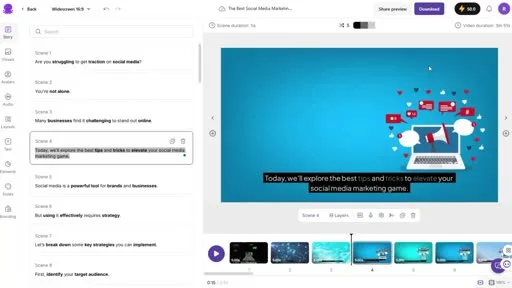
- No hard per-video length cap
- $29/mo for a 200-minute monthly pool
- Script/clip editor, not per-scene regen
- Scene-based, drag-and-drop interface
Best for: Repurposing existing long video or blog content into a video.
Fliki
Free tier caps at 1 min · paid unlocks more
Its 40-minute cap on the Premium tier is the highest stated ceiling in this list, and its per-scene script editor is a real editing surface, not a black box. The gap is visual: Fliki leans on stock footage and simple AI images per scene, and nothing in its pricing page promises consistent characters across a 40-minute run. For narration-over-B-roll explainer content that doesn't need a recurring visual character, it's a reasonable long-form option.
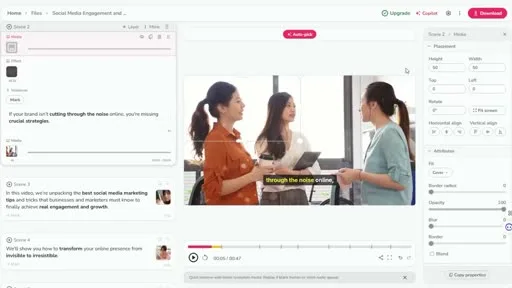
- 40-min cap on Premium — the highest stated ceiling here
- Scene-by-scene script editor
- 2,000+ voices, plus voice cloning
- Leans on stock footage — no character-consistency promise
Best for: Narration-over-B-roll explainer content that doesn't need a recurring visual character.
Synthesia
$18–29/mo · 10 min/mo
Caps you hard on monthly minutes rather than video length — Synthesia's Creator plan gives 30 minutes per month total, not per video. That's fine for one long video a month; it falls apart fast if you're running a channel that publishes weekly. It charges meaningfully more per minute than the other tools here, which is the avatar tax — a talking synthetic human costs more to render than a narrated image sequence.
- 30 min/month cap (Creator plan) — not per video
- Per-scene avatar editor
- Talking-head/corporate style, not faceless
- $1.50–2.50+/min effective cost — the avatar tax
Best for: Talking-head corporate or training video, published infrequently.
Elai.io
$29/mo · 15 min/mo
Caps you hard on monthly minutes rather than video length — Elai's Creator plan gives 15 minutes per month, with a $2/minute overage once you're past it. Same shape of limitation as Synthesia, and the same avatar tax: $1.50–2.50+ per minute on Elai's own math, since a talking synthetic human costs more to render than a narrated image sequence.
- 15 min/mo cap, $2/min overage
- Avatar-based scene editor
- Avatar-led explainer, not faceless
- Same avatar-tax pricing pattern as Synthesia
Best for: Avatar-led explainer video on a monthly cadence, not a weekly channel.
Vidnoz AI
$19.99–26.99/mo · credit-based
Has the most permissive length cap in the group at 60 minutes per video on paid plans, and its credit system (0.5 credits per second) is at least stated plainly on the pricing page. Its strength is avatar and template variety at volume — 1,900+ avatars — which is a different use case than a single consistent faceless documentary-style channel.
- Up to 60 min per video — the highest cap in this roundup
- Credit-based scene edits (0.5 credits/sec)
- 1,900+ avatars and templates
- Built for volume, not a single consistent character
Best for: Avatar/template video at high volume.
Narration and consistency, the two criteria that punish you late
These two categories don't show up in a 30-second demo. They show up at minute 12.
Narration quality compounds — a voice with slightly off pacing or robotic emphasis is tolerable for 45 seconds and grating by minute 10. Tools built on ElevenLabs or similarly trained neural voices (Longform Studio, and optionally Fliki's higher voice tiers) hold up noticeably better over a full video than tools relying on default TTS engines.
The consistency problem hides until minute 12
Character and visual consistency is the other one. A recurring host character, a consistent color palette, a specific illustration style — if it drifts between shot 5 and shot 25, a long-form viewer notices even if they can't articulate why. This is a much harder problem for a general-purpose faceless video ai than for a tool that treats visual planning as its own step with per-scene control, which is why it's worth testing before committing 20 minutes of your channel's runtime to a workflow.If you're still deciding whether AI-assisted long-form is worth the setup versus manual editing, the complete guide to faceless video and the breakdown of long-form vs. short-form content cover the format-level tradeoffs this article doesn't.
Picking one
If your channel is repurposing content you already wrote or recorded, Pictory's minute-pool pricing and blog-to-video pipeline is the pragmatic choice. If you want an avatar on screen and publish infrequently, Synthesia's editor quality justifies its price. If you're building a faceless long-form channel from a blank script — research, narration, visuals, and a render you can actually afford to iterate on — that's the specific gap Longform Studio is built to close, and it's worth comparing directly against the broader field of AI tools for a faceless YouTube channel before you commit a subscription.
Whichever tool you pick, don't take the vendor's headline length claim at face value — check whether that number is a per-video cap or a monthly pool, because the two are not the same promise, and the difference is exactly what a 60-second demo will never show you. For a wider view of the category beyond this shortlist, the long-form AI video generator roundup covers additional tools by use case.
FAQ
What is the best faceless AI video generator for long-form YouTube videos?
There's no single best faceless ai video generator for every channel — it depends on whether you're repurposing existing content (Pictory), need the highest stated length ceiling (Vidnoz AI at 60 minutes), or are building original scripted long-form content from scratch, where per-scene editing and transparent per-video cost matter more than a headline minute cap.
Can faceless AI video generators actually produce a 15-20 minute video?
Most can technically output that length, but check whether the pricing page caps it per video or per month. Fliki states a 40-minute per-video cap on its top tier; Synthesia and Elai.io cap total minutes per month instead, which limits how many long videos you can make even if any single one could be long.
Are faceless AI-generated videos eligible for YouTube monetization?
Yes. There's no minimum length requirement to join the YouTube Partner Program, and no rule against AI-assisted production as long as the channel meets YouTube's usual eligibility bar of 1,000 subscribers and 4,000 watch hours (or Shorts equivalent). Videos do need to run 8 minutes or longer to enable mid-roll ads, which is the main reason long-form and faceless AI production overlap so much.
Do these tools let you fix one mistake without redoing the whole video?
It varies a lot, and this is the criterion most demo-based reviews skip. Tools with a genuine scene-by-scene editor (Fliki's script editor, Synthesia's per-scene avatar tool, Longform Studio's per-scene regeneration) let you fix one line without touching the rest. Others effectively mean re-running the project any time you catch an error late.
Is a faceless video AI tool cheaper than editing long-form video manually?
Usually, at least in time. A 15-minute video that would take several hours to script, voice, and edit manually can go through an AI pipeline in under an hour of active work. The cost tradeoff is real, though: minute-pool and credit-based pricing can get expensive fast at long-form lengths, which is why checking a tool's actual dollar cost per finished video — not just its monthly subscription price — matters more here than for short-form.
Long-form ready shouldn't be a footnote on a pricing page
Longform Studio was built for the 15–30 minute range from the start: fix one line, only that scene regenerates, and every provider cost shows up as a real dollar figure before you commit.
Try Longform StudioNo markup on provider usage.