
How to Start a Faceless YouTube Channel in 2026 (Step-by-Step)
How to start a faceless YouTube channel: niche, channel setup, content system, first video, cadence, and the real path to monetization.
Key Takeaways
- Test a niche before committing: list 20 specific video titles you could make this month without repeating an angle. If you can't get past 12, the niche is too narrow.
- Turn on 2-Step Verification and Studio “advanced features” on day one — both are monetization prerequisites, not day-one busywork.
- Most faceless channels stall after three uploads because every video is treated as a one-off project instead of a repeatable pipeline.
- 15+ minute videos support multiple mid-roll ads, a structural reason long-form RPM tends to run above short-form in the same niche.
- YouTube Partner Program eligibility needs 1,000 subscribers plus 4,000 watch hours (or 10M Shorts views in 90 days) — realistically a 6–12 month climb at a weekly cadence.
Step 1: Pick a Niche You Can Sustain for 100 Videos, Not 10
The decision here isn't “what am I interested in.” It's “what can I source, script, and produce on a weekly cadence without running out of material by month three.” A niche like “true crime” or “AI news” survives that test because the source material regenerates itself. A niche like “my favorite 90s sitcoms” does not — you'll exhaust the good episodes in six weeks and be stuck padding videos with filler.
The mistake most beginners make here is optimizing for personal passion over supply. Passion gets you through video one. A durable source of raw material — ongoing news, a large historical archive, an evergreen how-to category — gets you through video one hundred. Test a niche by listing 20 specific video titles you could make this month without repeating an angle. If you can't get past 12, the niche is too narrow.
DecodingYT — a faceless YouTube-growth channel that's crossed 1M subscribers doing exactly this — makes the supply test concrete in How to Start a Faceless YouTube Channel from NOTHING, a walkthrough produced with vidIQ. The channel it cites as the branding model, “easy, actually” (also over 1M subscribers), reuses the same yellow-black-white palette and Comic Sans font on every thumbnail specifically so a returning viewer recognizes the channel “instantly just from the colors before they even read the title” — proof that a durable niche and a repeatable visual system compound the same way a face would on a normal channel.
For a working list of niches with realistic competition levels, see best faceless YouTube niches and faceless YouTube channel ideas — both go deeper than this step alone can.
Step 2: Set Up the Channel Correctly the First Time
Creating the channel itself is trivial: sign into a Google Account, go to your account menu, and choose “Create a channel.” You can do this as your personal account or as a separate Brand Account, which YouTube's own setup guide recommends if you ever want a second person managing the channel or a name that doesn't match your Google login — almost always the right call for a faceless channel you might later hand off or sell.
The decision that actually matters at this step is the handle and channel name — pick both assuming you will never change them casually, because a rename mid-growth resets nothing structurally but confuses returning viewers and breaks any external links you've already shared. The mistake beginners make is treating setup as disposable — using a placeholder name “for now” — and then building 40 videos of brand recognition around a name they didn't mean to keep.
Turn these on now, not later
Enable 2-Step Verification on the Google Account (required before you can apply to the YouTube Partner Program later) and turn on “advanced features” in Studio settings, which removes upload limits and is also a monetization prerequisite. Doing this on day one means it's not a blocker in month six.Step 3: Build the Content System Before You Touch a Camera
This is the step almost everyone skips, and it's the one that determines whether the channel survives past video five. A faceless channel isn't one video — it's a repeatable pipeline: source material in, script out, visuals matched to the script, narration recorded, edited, published. If that pipeline exists only in your head, every video takes longer than the last one because you're re-inventing the process each time instead of running it.
The concrete decision: write down your actual production steps before you start, in order, with what tool handles each one — research, script, images, voice, edit, render, upload. Beginners instead treat every video as a one-off project, which is why so many faceless channels stall after three uploads: the second and third videos took as long as the first because nothing was systematized.
This is the exact gap Longform Studio is built to close for long-form (8–30 minute) narrated videos — one workspace where source-backed research, sentence-level script editing, AI storyboard images with consistent characters, ElevenLabs narration, and cloud rendering happen in sequence instead of across four disconnected tools, with the ability to regenerate a single scene instead of the whole project when one line changes.
If you're deciding what actually goes into that pipeline for a faceless format specifically, how to make faceless YouTube videos covers the production side step by step.
Step 4: Make a First Video That's Built to Be Repeated, Not Perfected
The decision at this step is scope, not quality. Your first video should be short enough to finish in a weekend and structured exactly like your fifth video will be — same intro pattern, same visual style, same pacing — because the point of video one is proving the pipeline works, not producing your best possible output. Beginners do the opposite: they spend three weeks polishing a single 25-minute video, treat it as a one-time achievement, and have no template left over for video two.
Long-form specifically matters for a faceless channel's economics: 15+ minute videos support multiple mid-roll ads, which is a meaningful part of why long-form RPM tends to run well above short-form RPM in the same niche. That's a structural reason to build your system around a repeatable 10–20 minute format from the start rather than treating your first long video as a special project.
Reused content is excluded from monetization
Before publishing, sanity-check the video against YouTube's reused content policy: channels that repurpose existing footage or text “without adding significant original commentary, substantive modifications, or educational or entertainment value” are excluded from monetization, separately from any copyright issue. If your format leans on stock footage, archive clips, or text readings, the commentary and structure you add is what makes it eligible — not just the topic.Step 5: Set a Publishing Cadence You Won't Quietly Abandon
The decision here is picking a frequency you can actually hold for three months, not the frequency that sounds ambitious in a plan. Once weekly, sustained, beats twice weekly for a month that collapses to nothing. YouTube's algorithm and audience-building both reward consistency more than volume — a channel that reliably posts every Thursday builds a return-viewer habit that a channel posting five videos one week and zero the next never does.
The mistake is announcing a cadence you set based on motivation rather than your actual production time per video. Time one full video, start to finish, including the edit and thumbnail. Whatever that number is, that's your real cadence ceiling — not what you hope it'll shrink to once you get faster.
Step 6: Know the Actual Monetization Requirements Before You Chase Them
To join the YouTube Partner Program, a channel needs either 1,000 subscribers with 4,000 valid public watch hours in the past 12 months (the long-form path), or 1,000 subscribers with 10 million Shorts views in the past 90 days. You also need no active Community Guidelines strikes, 2-Step Verification enabled, residence in an eligible country, and a linked AdSense account. Meeting the numbers gets you a review, not an automatic approval — YouTube checks the channel against its monetization policies before turning ads on.
YouTube Partner Program — monetization math
1,000
Subscribers required either path
4,000 hrs
Watch hours in the past 12 months (long-form path)
10M
Shorts views in 90 days (alternate path)
6–12 mo
Realistic timeline at a weekly long-form cadence
Sources: YouTube Partner Program eligibility
There's no official YouTube figure for how long that takes, and treat any site that gives you one exact number with skepticism. Realistically, a channel publishing weekly, decent-retention long-form video in a niche with real search demand tends to cross both thresholds somewhere in the 6–12 month range; aggressive Shorts-first strategies can compress that to 2–4 months by front-loading subscriber growth, though Shorts-feed watch time doesn't count toward the 4,000-hour long-form threshold. The lever that actually moves this timeline isn't luck — it's upload frequency and retention, since a channel stuck at 3,800 watch hours after a year almost always has a video-length or retention problem, not a discovery problem.
The long-form path
1,000 subs + 4,000 watch hours in 12 months
- Supports multiple mid-roll ads
- RPM tends to run above Shorts in the same niche
- Realistic timeline: 6–12 months at weekly uploads
Best for: Channels building a durable, evergreen niche who can hold a weekly cadence.
The Shorts-first path
1,000 subs + 10M Shorts views in 90 days
- Front-loads subscriber growth
- Watch time doesn't count toward the 4,000-hour threshold
- Can compress the timeline to 2–4 months
Best for: Channels optimizing purely for the fastest route past the subscriber gate.
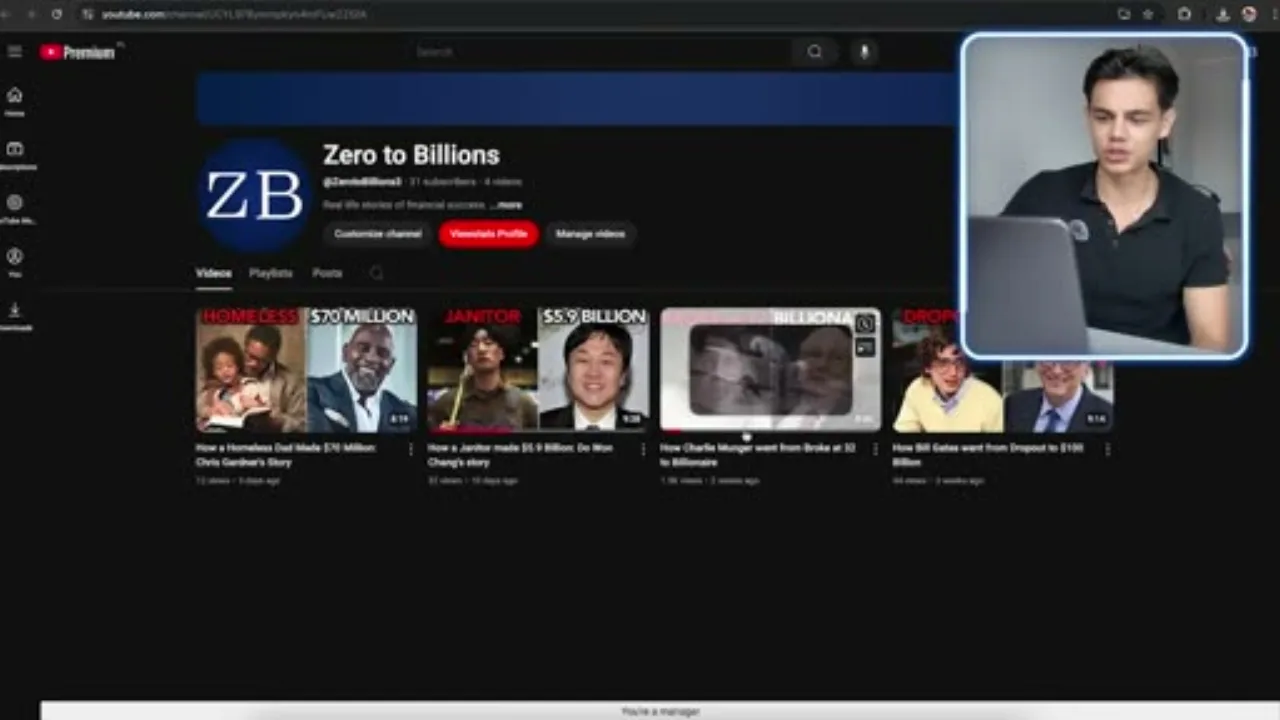
What that math looks like in month one, on a real channel, is worth watching rather than estimating. Creator Freddy Henle documents his first 30 days running a faceless finance-biography channel called Zero to Billions in I Tried Faceless YouTube for 30 Days (Realistic Results): four videos, 31 subscribers gained, and — the number that actually matters against the Partner Program bar above — 66 watch hours against the 4,000-hour threshold.
Almost all of that traction came from a single video, a Charlie Munger biography that kept climbing days after publishing, while the other three sat at 12, 32, and 44 views — the retention-and-luck lesson behind Step 5's cadence advice in concrete form: most of your early videos won't move the needle, and that's normal, not a sign to quit.
— Freddy Henle, I Tried Faceless YouTube for 30 Days (Realistic Results)
For what earnings actually look like once you clear that bar, do faceless YouTube channels make money has the realistic numbers by niche rather than the inflated ones.
Once the pipeline above is running and you're publishing on a cadence you can hold, the bottleneck stops being ideas and starts being hours in the edit — which is the point at which most creators start looking for something like Longform Studio to take the research-to-render chain off their plate instead of running it by hand every week.
FAQ
How long does it take to start a faceless YouTube channel and see results?
You can complete channel setup in under an hour, but reaching monetization eligibility (1,000 subscribers and 4,000 watch hours) realistically takes 6–12 months of consistent weekly publishing for most niches, faster with an aggressive Shorts-first growth strategy and slower in low-search-demand niches.
Do I need expensive equipment to start a faceless YouTube channel?
No. A faceless channel replaces camera and lighting costs with a script, AI or stock visuals, and a narration voice, so the minimum viable setup is a laptop, a scriptwriting workflow, an image or video source, and a text-to-speech or recorded voiceover tool.
What's the biggest mistake people make when they start a faceless YouTube channel?
Treating the first video as a one-off project instead of building a repeatable system for research, scripting, visuals, and editing — which is why so many channels post three videos and then stop, since each video took as long as the last one instead of getting faster.
Can I use AI to make a faceless YouTube channel?
Yes, for research, scripting, narration, and visuals — but YouTube's reused-content and monetization policies still require your video to add substantive commentary, structure, or value beyond source material, whether that material was gathered by AI or by hand.
Is a faceless YouTube channel still worth starting in 2026?
Long-form faceless channels in durable niches (finance, history, true crime, tech explainers) still have real audience demand and RPMs meaningfully above short-form, but the format is more competitive than it was two years ago, so a specific, sustainable niche matters more now than a broad one.
Video one should be the first of a hundred
Step 3 above is the one people skip — a repeatable research-to-render pipeline. Longform Studio builds it for you: source-backed research, sentence-level script editing, consistent AI storyboard images, ElevenLabs narration, and cloud rendering, in one workspace instead of four disconnected tools.
Try Longform StudioBuilt for the 8–30 minute long-form format this guide recommends.