
How to Make YouTube Videos With AI (Prompt to Published)
How to make YouTube videos with AI, step by step — DIY tool stack vs. an integrated workflow, with real per-step costs and YouTube's disclosure rules.
Seven browser tabs. That’s the honest starting point for most people who try to make YouTube videos with AI: one for the chatbot writing the script, one for the voice tool, one for the image generator, one for the editor’s timeline, one for YouTube Studio, and two more for the tutorials explaining why the audio is out of sync with the images. None of this is a rumor — it’s the default path, and it works. It’s just slower and leakier than the arithmetic suggests, and almost nobody accounts for the disclosure step until an upload gets flagged.
This is a real walkthrough of both routes: assembling the stack yourself, tool by tool, and using an integrated pipeline that does the same five steps in one workspace. Same output — an 8–20 minute narrated video — two different amounts of your Tuesday.
Key Takeaways
- One 15-minute video costs a DIY stack ~$82–95/month across four subscriptions and 2.5–5.5 hours of hands-on time — an integrated pipeline runs the same five steps in ~50–90 minutes.
- Every route, DIY or integrated, passes through the same five stages: script, voice, visuals, assembly, disclosure.
- Disclosure is a labeling requirement, not a monetization gate: YouTube’s own guidance says the “Altered content” toggle doesn’t limit reach or affect monetization eligibility.
- Visuals is where the two routes diverge most: keeping a character or style consistent across 20+ scenes is the real DIY time cost, not the subscription.
- Catching a factual error after the script is finished means redoing script, audio, and image timing by hand in the DIY stack — one sentence and one image in a pipeline built around scene structure.
The five steps, whichever route you take
Every long-form AI-narrated video, regardless of tooling, passes through the same five stages:
- Script — research the topic, write a narration script with scene breaks
- Voice — turn the script into narrated audio
- Visuals — generate or source images/video for each scene
- Assembly — sync audio to visuals, add captions/transitions, export
- Disclosure and upload — label the video correctly and publish
The DIY route runs these as four separate tools with manual handoffs. The integrated route runs them as one pipeline. Below, each step, side by side, with what it actually costs.
Grow with Alex, a YouTube automation channel with about 236K subscribers, walks the DIY stack start to finish in one screen-recorded video — script, voiceover, edit, thumbnail, upload — using free tools instead of paid subscriptions.
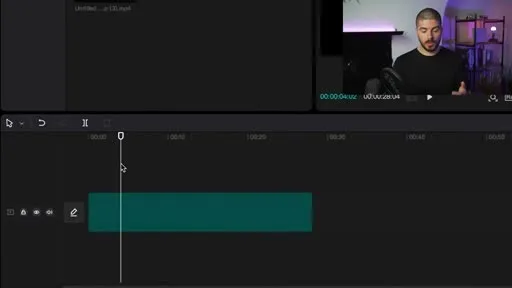
He generates the full script from a single ChatGPT prompt in what he calls “a matter of seconds,” then times the CapCut assembly step — dragging a voiceover and stock clips onto the timeline — at “five to ten minutes.” That’s faster than the estimates below because his route skips per-scene image generation entirely and drags in stock footage instead; it’s the trade-off the DIY route always offers: cut a step and you cut the time, at the cost of a video that looks like everyone else’s stock footage. Even in his fastest version of the DIY stack, the manual timeline work in step 4 is still the step he narrates most carefully.
Step 1: Script
DIY route
45–90 min · $20/month (ChatGPT Plus)
Open ChatGPT, Claude, or Gemini. Prompt for an outline, then a full script, then edit the AI’s generic phrasing out of it by hand — the “in today’s video” openers, the summary-at-the-end habit, the hedging. A 2,500-word script (roughly a 15-minute video at typical narration pace) takes 45–90 minutes once you include research and rewriting, because the chatbot doesn’t know your sources are current or verify any claim it makes.
- Tool: ChatGPT Plus, $20/month, or Claude Pro, similar
- Time: 45–90 minutes per script
- Failure mode: unsourced claims, generic phrasing that needs a manual pass
Integrated route
15–25 min
A script tool built for YouTube narration keeps research sourced and lets you edit at the sentence level instead of regenerating whole paragraphs. Longform Studio’s script generator attaches sources to claims as it writes and keeps a scene structure from the first draft, so step 3 isn’t a separate reformatting job.
- Time: 15–25 minutes to a scene-broken, source-backed draft
Step 2: Voice
DIY route
15–30 min · $22/month (ElevenLabs Creator)
Paste the script into ElevenLabs. As of mid-2026, ElevenLabs’ Starter plan is $6/month (minimum for commercial usage rights) and its Creator plan is $22/month with 121,000 credits and professional voice cloning — the tier most regular creators land on. A 15-minute video needs roughly 15,000–20,000 characters of narration, comfortably inside the Creator tier’s monthly allowance for one or two videos a week. Generation itself takes 5–10 minutes, but you’ll re-run sections after the script gets edited in step 1, because voice and script live in different tools with no shared state.
- Tool: ElevenLabs Creator, $22/month
- Time: 15–30 minutes including re-runs after edits
- Failure mode: script edits after this step mean regenerating audio, then re-matching image timing by hand
Integrated route
5–10 min
Narration generates from the same script the images are keyed to, with measured timing per sentence, so an edit to the script doesn’t strand the audio or the visuals — only the changed portion re-renders.
- Time: 5–10 minutes, and edits don't cascade
Step 3: Visuals
DIY route
40–80 min · $30/month (Midjourney Standard)
Generate or source an image per scene. Midjourney’s Basic plan is $10/month for about 3.3 hours of fast generation; Standard is $30/month with unlimited relax-mode generation, which is what most people actually need once they’re iterating on a character’s appearance across 20+ scenes. Consistency is the real cost here, not the subscription: keeping a recurring character or visual style coherent across a video means re-prompting, re-rolling, and manually picking the closest match, scene by scene. Budget 2–4 minutes per image once you include the misses — 40–80 minutes for a 20-scene video.
- Tool: Midjourney Standard, $30/month
- Time: 40–80 minutes for ~20 scenes
- Failure mode: character/style drift between scenes; no per-scene undo — a bad batch means re-prompting from scratch
Integrated route
20–35 min
Still-image generation with a persistent character and style reference, and selective per-scene regeneration — change one scene without touching the other nineteen. This is the step where the two routes diverge most in practice, not just in tool count.
- Time: 20–35 minutes for the same 20 scenes, plus regeneration only costs the changed scenes later
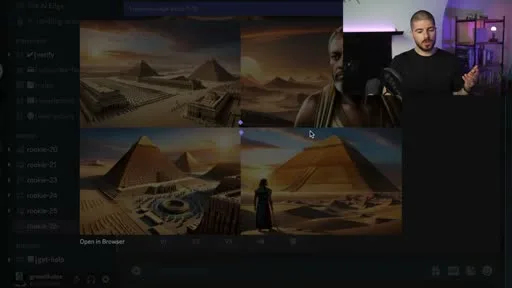
This is the batch-and-pick reality of the image step: a grid of variants comes back per prompt, and picking the closest match — or re-rolling — is the 2–4 minutes per image the DIY estimate above accounts for.
Step 4: Assembly
DIY route
60–120 min · $10–23/month (CapCut Pro or Premiere)
Import narration and images into CapCut (free, or Pro around $10/month) or Premiere Pro (~$23/month). Time each image to the audio manually, add captions (auto-caption tools help but need review), render. For a 15-minute video this is 60–120 minutes of timeline work even for someone fluent in the editor, longer for a first attempt.
- Tool: CapCut Pro or Premiere, $10–23/month
- Time: 60–120 minutes
- Failure mode: audio/image drift if the script changed after voice was generated; manual caption sync
Integrated route
10–20 min
Sentence-anchored timing means images and captions are already synced to the narration before assembly starts. Preview, adjust, render to the cloud.
- Time: 10–20 minutes to preview and send to render
Step 5: Disclosure and upload
This step is identical either way, and it’s the one most tutorials skip.
YouTube requires creators to disclose “realistic” AI content — content a viewer could mistake for a real person, place, or event, including synthetic voices and AI-generated visuals presented as real. You disclose it in YouTube Studio’s upload flow, under Details, by selecting “Yes” under Altered content. Per YouTube’s official guidance, disclosing AI use does not limit a video’s reach or affect monetization eligibility — the label just appears in the description and, for sensitive topics, in the player.
Disclosure is a labeling requirement, not a monetization gate
Two things get conflated and shouldn’t. Scripts, outlines, thumbnails, and voice cloning of your own voice for your own narration don’t require disclosure at all — that’s “production assistance,” explicitly exempted. Monetization risk comes from a different policy entirely: YouTube’s spam and inauthentic content policy targets mass-produced, templated videos with minimal variation between them — not AI use itself. A channel publishing one well-researched, narrated video a week with original visuals doesn’t trip this; a channel running the same template with swapped stock footage twenty times a day does.
Skip the disclosure toggle on content that needs it and the consequence isn’t obscure — YouTube has stated that consistent failure to disclose can lead to content removal or suspension from the Partner Program. It takes fifteen seconds per upload. There’s no version of the DIY-vs-integrated argument where this step gets automated away; you make the call, every time.
The arithmetic, side by side
For one 15-minute video, first time through each tool:
| Step | DIY time | DIY monthly cost | Integrated time |
|---|---|---|---|
| Script | 45–90 min | $20 (ChatGPT Plus) | 15–25 min |
| Voice | 15–30 min | $22 (ElevenLabs Creator) | 5–10 min |
| Visuals | 40–80 min | $30 (Midjourney Standard) | 20–35 min |
| Assembly | 60–120 min | $10–23 (editor) | 10–20 min |
| Total | ~2.5–5.5 hrs | ~$82–95/mo | ~50–90 min |
DIY stack vs. integrated pipeline, one 15-minute video
2.5–5.5 hrs
DIY hands-on time, four tools
~50–90 min
Integrated hands-on time
$82–95/mo
DIY subscriptions (ChatGPT, ElevenLabs, Midjourney, editor)
$49/mo
Longform Studio Creator plan, plus per-video generation cost
The DIY total doesn’t include render time, re-exports after an edit gets missed, or the learning curve on four separate interfaces. It also doesn’t include what happens when you catch a factual error in minute 8 of a finished script: in the DIY stack, that’s a new script, new audio, and re-timed images. In a pipeline built around scene structure and per-scene regeneration, it’s one sentence and one image.
The dollar comparison isn’t as lopsided as the time comparison — you’re paying for tool access either way. Longform Studio runs $49/month on the Creator plan plus production costs billed in real dollars per video, not opaque credits, which lands in a similar range to stitching together four subscriptions once you’re producing regularly. The case for an integrated route isn’t that it’s cheaper in subscription terms. It’s that editing one sentence doesn’t force you to redo three other tools’ worth of work, and that source-backed research and per-scene edits are built into the workflow rather than something you reconstruct by hand every time the script changes.
If you’re deciding between the two, the real question isn’t “can I do this with free tools” — you can, and the DIY route is a legitimate way to learn what long-form AI video production actually involves. It’s whether you’re publishing one video to see if the format works, or ten a month where the compounding edit cost is the thing that actually determines how much you make. For background on the format itself, see how to make a long-form video on YouTube and, if faceless is the goal specifically, how to make faceless YouTube videos covers the parts specific to never appearing on camera. What counts as “long enough” in the first place is its own question — long-form vs. short-form content lays out how the 8–30 minute band affects retention and RPM. For a deeper look at end-to-end tooling, our long-form AI video generator guide covers the render and delivery side in more detail, and if a single all-in-one “generate video” button is what you’re actually asking about, the best faceless AI video generators roundup covers why most of those still need real cleanup afterward.
FAQ
Do I have to disclose AI-generated voiceovers on YouTube?
Not if it's your own cloned voice narrating your own script — that counts as production assistance, which is exempt. Disclosure is required when the content could pass as a real, unaltered recording of an event, person, or place that didn't actually happen that way. Most narrated explainer or documentary-style videos with AI-generated illustrative visuals do need the "Altered content" toggle set to yes in YouTube Studio, because the visuals depict scenes that didn't literally occur.
Will using AI tools hurt my YouTube monetization?
No, not on its own. YouTube's inauthentic content policy restricts mass-produced, templated videos with little variation — not AI use. A channel that researches, scripts, and narrates original videos with AI assistance is treated the same as one using traditional tools, provided the content is genuinely original per video.
How much does it actually cost to make one AI YouTube video?
Assembling your own stack (ChatGPT, ElevenLabs, Midjourney, an editor) runs roughly $82–95 a month in subscriptions if you're producing regularly, plus 2.5–5.5 hours of hands-on time per 15-minute video. An integrated tool folds those steps into one workspace and one subscription, typically trading a comparable dollar cost for a much shorter production loop, especially on revisions.
Can I make a full YouTube video with just one AI tool?
Some all-in-one generators promise this, but most produce generic pacing, inconsistent character visuals, and scripts that read like nobody edited them — reasons these tools tend to get flagged as low-effort by both viewers and, eventually, YouTube's inauthentic content review. A workflow that still gives you sentence-level script control and per-scene visual edits produces a meaningfully different result than a single "generate video" button.
What video length counts as "long-form" for this workflow?
YouTube itself doesn't set a hard cutoff, but in practice 8–30 minutes is the band where a narrated, researched AI-assisted video performs best for watch time and mid-roll ad placement — long enough to develop a topic, short enough to hold attention without padding.
The DIY column of that table is now optional
This article walked through the same five steps two ways: four subscriptions with manual handoffs, or one workspace where a script edit doesn't cascade into redone audio and re-timed images. Longform Studio is the second route — sourced research, sentence-level script edits, consistent characters across scenes, and a synced render, for $49/month plus real generation cost.
Start with Longform Studio$49/month plus real generation cost — no opaque credit balance.