
Best AI Voice for YouTube Videos (Tested for Long-Form)
The best AI voices for YouTube narration, judged on 15-minute listenability: tools, costs per video, and settings that sound human.
Key Takeaways
- The 15-minute test beats any 30-second demo: pacing drift, breath artifacts, and name/number mispronunciation only show up past minute 8 or so.
- Cost per 10-minute video ranges from $0.03 (Google Cloud WaveNet) to $2.42 (Murf, amortized) across the five tools tested here — a 80x spread most roundups never compute.
- ElevenLabs' Multilingual v2 model, not the newer v3, is what working creators actually use for long-form narration — v3 is more expressive but still alpha-stage and prone to drifting off a cloned voice.
- YouTube doesn't penalize AI narration for monetization, and cloning your own voice for a voiceover is explicitly exempt from the AI-disclosure requirement.
The 15-minute test
Thirty seconds into almost any demo, every AI voice sounds fine. Type a sentence, hit generate, and the output is smooth, clear, and confident enough to fool a casual listener. That’s the test every comparison video runs, and it’s the wrong one for anyone actually making faceless YouTube videos. The real question isn’t whether a voice survives one line — it’s whether it survives fifteen minutes of a viewer’s attention without the cadence flattening into a metronome, a name landing wrong, or a breath sound phasing in and out like a bad Bluetooth connection.
That’s the bar this piece uses to judge the best AI voice for YouTube in 2026: not a punchy demo clip, but a full upload — the kind of narration a documentary, explainer, or Reddit-story channel actually needs, minute eight through minute eighteen, not just minute one.
What actually breaks at minute eight
Run the same tool for fifteen minutes instead of fifteen seconds and a specific, repeatable set of problems shows up. This is the checklist worth running against any narration before it goes into a real upload:
- Pacing holds steady from minute 1 to minute 15 — no gradual drift into a faster, flatter cadence by the end of a long take
- Breath sounds and mouth clicks are either consistently present (real mic artifacts) or cleanly absent — not flickering in and out mid-sentence
- Names, acronyms, and numbers are pronounced correctly on a full script read, not just the one demo line every tool cherry-picks
- Emotional tone varies sentence to sentence across the whole script, not just in the 10-second promo clip
- Sibilants and long vowels don't smear or clip once YouTube's loudness normalization (roughly -14 LUFS) is applied on playback
- The same voice ID sounds identical in episode 1 and episode 40, months apart — not subtly different after a model update
Most comparisons never run this test
Nearly every AI voice roundup online plays a single generated sentence per tool and calls it a verdict. That tells you whether a voice can nail a tagline. It tells you nothing about whether it can carry a 12-minute true-crime script without the listener's ear catching the seams.The tools, honestly rated for long-form
Four categories cover almost everything creators actually reach for in 2026: ElevenLabs, OpenAI's TTS API, Google Cloud's Text-to-Speech, and the Murf/Play.ht tier of creator-studio tools built for corporate and multi-voice work.
ElevenLabs
The realism standard
- Stability, similarity, and style-exaggeration sliders
- Custom + cloned voices, 30+ languages
- Multilingual v2 model — the one that holds up long-form
- v3 model is more expressive but still alpha-stage
Best for: Channels that need the most natural long-form narration and don't mind tuning settings per script.
OpenAI TTS
Cheap, flat, no subscription
- $15/1M characters (tts-1), $30/1M (tts-1-hd)
- Pay-per-character — no monthly plan required
- No stability or similarity controls to tune
- Consistent and fast, noticeably flatter delivery
Best for: Budget narration with minimal setup, where emotional range matters less than cost.
Google Cloud TTS
Cheapest at scale
- $4/1M characters (WaveNet), 4M free every month
- SSML pitch/rate control, no emotion slider
- Studio and Chirp 3: HD tiers cost far more ($160 and $30/1M)
- Best cost-to-quality ratio of anything tested here
Best for: High-frequency or daily-upload channels where narration cost compounds fast.
Murf & Play.ht
The studio tier
- Murf: drag-and-drop editor, music + video bundled in
- Play.ht: 800+ voices across 140+ languages and accents
- Both bundle voice cloning into their paid tiers
- Neither is purpose-built around 15+ minute narration
Best for: Murf for corporate-style explainers with built-in music/timeline; Play.ht for voice and accent variety.
What a 10-minute video actually costs
Every pricing page advertises a monthly plan or a per-character rate. Almost none of them tell you what that means for one real video, so here's the arithmetic, shown rather than asserted:
Estimate script length
~150 words/minute of narration × ~5 characters/word ≈ 750 characters per minute of finished audio.
Scale to 10 minutes
750 × 10 ≈ 7,500 characters. Every cost figure in the table below is built from this one number.
Apply each tool's rate
Metered tools: rate × 7.5 (thousands of characters). Subscription tools: monthly fee ÷ videos the plan's allotment covers.
Multiply by a real schedule
A weekly 10-minute channel (52 uploads/year) spends $0–$1.56 a year on Google WaveNet narration, or a flat $264–$468 a year on a subscription tool regardless of volume.
| Tool | Billing model | Monthly allotment | Videos/mo it covers | Effective cost/video |
|---|---|---|---|---|
| Google Cloud TTS (WaveNet) | Pay-per-character | First 4M chars/mo free, then $4/1M | ~533 free, unlimited after | $0.00–$0.03 |
| OpenAI TTS (tts-1-hd) | Pay-per-character | No monthly plan | Unlimited | $0.23 (tts-1 standard: $0.11) |
| Play.ht (Creator) | Subscription, $39/mo | 250,000 characters | ~33 | $1.17 |
| ElevenLabs (Creator) | Subscription, $22/mo | 121,000 credits | ~16 | $1.36 |
| Murf (Creator) | Subscription, $29/mo | ~24 hrs of audio/year | ~12 | $2.42 |
ElevenLabs, OpenAI, and Google Cloud figures are confirmed directly against each vendor's current pricing page. Murf and Play.ht plan details are cross-checked across several independent 2026 pricing trackers, since neither vendor's pricing page renders its numbers as static text — treat those two as directionally accurate rather than penny-exact.
AI voice economics for a 10-minute YouTube video
$0.03
Cheapest verified cost per video (Google WaveNet)
533
10-minute videos Google's free WaveNet tier covers before billing starts
$2.42
Priciest of the five tools tested, amortized (Murf Creator)
8,000
Watch hours new YPP applicants need starting Feb 1, 2027
Sources: Google Cloud Text-to-Speech pricing · YouTube monetization requirements
The settings nobody mentions in the tutorials
Isaac, a 213K-subscriber creator, spent an entire video (How I Actually Make AI Voice Sound Real) on exactly this problem — not which tool to buy, but why a technically good AI voice still sounds like an AI voice once it runs past a minute. His breakdown lands on four things that matter more than the tool itself: consistent tonal variation instead of a flat monotone, pauses placed on the sentences that need emphasis rather than stripped out entirely, emphasis on the words that carry meaning, and a script that wasn't dumped wholesale out of a chatbot — because a robotic script defeats even a great voice.
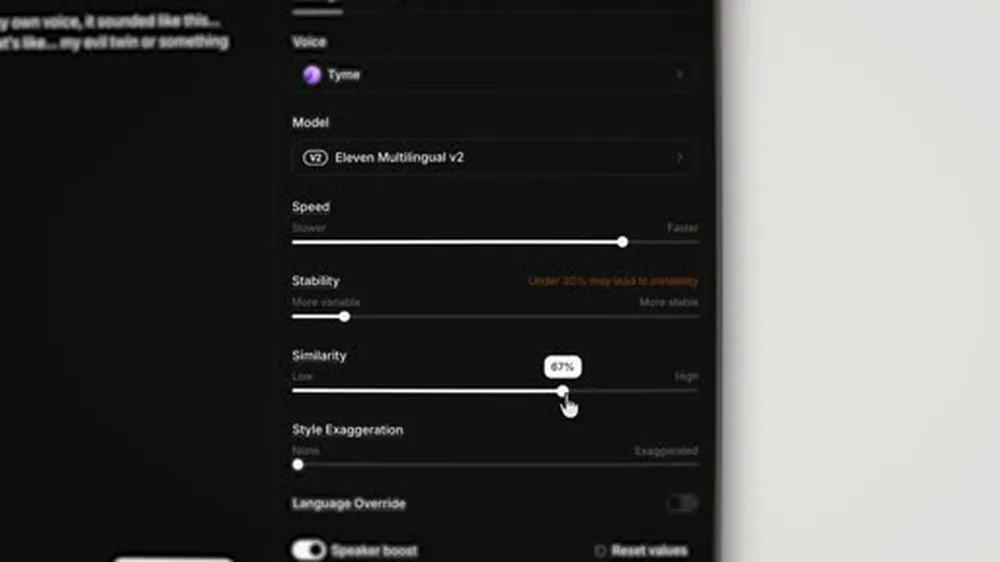
On the tool itself, he settles on ElevenLabs’ Multilingual v2 model over the newer v3 — v3 can whisper, giggle, and shift emotion on command, but as of this testing it’s still an alpha model that noticeably drifts off a cloned voice’s actual sound. Inside v2, his working settings are speed nudged up slightly, stability dragged down toward the tool’s own warning line — ElevenLabs flags anything under 30% as risking instability — and similarity pushed to around 70%, with style exaggeration raised from zero.
Generate in sentences, not in one pass
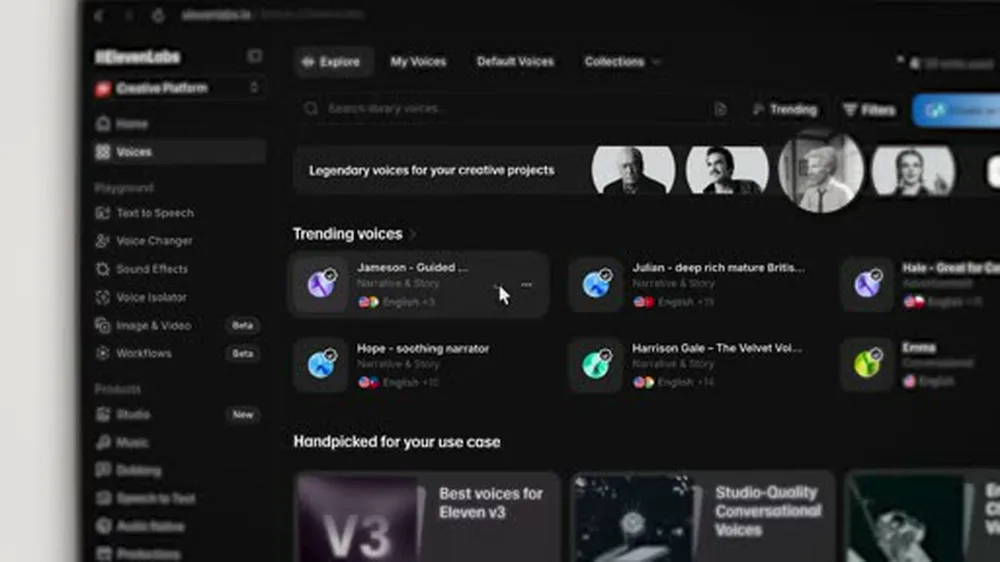
The other habit that matters as much as any slider: generate a script a few sentences at a time instead of pasting the whole thing into ElevenLabs at once. Every generation shifts the tone slightly even on identical text, which is what a real human's voice does too — variation a single 12-minute batch render can't produce. Take the two free regenerations each pass includes, and splice the strongest section of each into the final line.That splicing is exactly the kind of manual labor Longform Studio’s narration step exists to remove — it generates ElevenLabs narration with measured timing and syncs it straight to the storyboard, so the multi-take assembly happens once inside the pipeline instead of by hand, sentence by sentence, for every episode.
The YouTube policy angle
Two separate questions get conflated constantly: does an AI voice hurt monetization, and does it need to be disclosed? The answers are different, and neither one is the vague "it's risky" verdict a lot of forum threads land on.
On monetization, YouTube's Partner Program requirements — 1,000 subscribers and 4,000 watch hours today, or 10 million Shorts views in 90 days — don't check who or what recorded the narration. They check whether the content is original rather than reposted or compiled from other creators' material. An AI-narrated documentary built from your own research and script clears that bar the same as one read by a human. YouTube also announced on August 10, 2026 that new applicants starting February 1, 2027 will need a higher bar — 8,000 watch hours or 20 million Shorts views — a monetization-gate change with nothing to do with the narration format; see the current YouTube monetization requirements for the full breakdown.
On disclosure, YouTube's own help pages are specific: creators must disclose realistic altered or synthetic content that could mislead a viewer about whether something actually happened — a fabricated event, a real person appearing to say or do something they didn’t. Standard faceless narration over stock footage or AI stills isn’t what the rule targets, and YouTube explicitly excludes cloning your own voice to record a voiceover or dub from the disclosure requirement. Where the rule clearly does apply is a realistic AI avatar paired with a cloned voice standing in for an identifiable real person — that combination is squarely what the policy exists to catch.
Minor edits still don't need disclosure
YouTube's own guidance draws the line at edits that are "primarily aesthetic" and don't mislead a viewer about what actually happened. Cleaning up breath sounds, adjusting pacing, or re-recording a line with the same cloned voice all fall on the no-disclosure side of that line.One voice, one channel
Every tool in the comparison table above supports switching voices video to video. Almost nothing about doing so is a good idea. Viewers build the same relationship with a channel's narrator that they would with a podcast host — swap it and the channel stops feeling like the same show, even if every individual video sounds fine on its own. It also has a quieter cost: on tools with custom or cloned voices, testing a replacement burns the same credits as narrating an actual episode, so "just try a different voice" is rarely as cheap as it sounds once a channel is 40 episodes deep.
This is also the pattern showing up across creator discussion of AI-narrated channels right now — less debate over which tool sounds best in isolation, more consensus that the actual differentiator is picking one voice during setup and never touching it again. It's one of the only production decisions on a faceless YouTube video workflow that's genuinely expensive to reverse later, which makes it worth getting right before video one rather than fixing it after video twelve.
The same discipline matters for keeping a character visually consistent across scenes — a channel's voice and its on-screen identity are both promises to a returning viewer, and both are far cheaper to lock in once than to patch later.
A real multi-tool test, not a demo reel
Kevin Stratvert (4.38M subscribers) ran one of the more even-handed multi-tool rounds this year, testing ElevenLabs, Murf, Play AI, WellSaid Labs, and Hume AI against real scripted lines rather than single-word demos. His verdict lines up with the settings-level testing above: ElevenLabs as the realism benchmark — "the gold standard," in his framing — with natural pacing and emotional range that the others chase but don't quite match. Murf ranks second, but for a different job: he pitches it at business and training content rather than personality-driven narration, with a built-in drag-and-drop editor that bundles music and video timing. Play AI (Play.ht) comes in for sheer range — 800-plus voices across 140-plus languages and accents, plus lip-sync and a voice-cloning feature included even on its free tier.
FAQ
Does using an AI voice hurt my chances of getting monetized on YouTube?
No. YouTube's Partner Program requirements (1,000 subscribers and 4,000 watch hours, or 10 million Shorts views in 90 days) don't check who or what recorded the narration — they check whether the channel posts original, substantially transformed content rather than reposted or compilation material. An AI-narrated documentary you researched and scripted yourself clears that bar the same as one read by a human.
Do I have to disclose that a video uses an AI voice?
Only if the content is realistic enough that a viewer could mistake it for something that actually happened, and the disclosure applies to that realism, not to narration on its own. Standard narration over stock footage or AI stills generally doesn't trigger it, and YouTube's own guidance explicitly exempts cloning your own voice to record a voiceover or dub. A realistic AI avatar combined with a cloned voice standing in for a real person is the combination the rule actually targets.
What's the cheapest AI voice for YouTube that still sounds decent?
Google Cloud's WaveNet voices, at $4 per million characters with the first 4 million characters free every month — enough for roughly 500 ten-minute videos before any billing starts. The tradeoff is control: there's no stability or similarity slider, just SSML tags for pitch and rate, so getting emotional variation takes more manual scripting than a tool built specifically for creators.
Should I use a different AI voice for every video on my channel?
No. Viewers build a relationship with a channel's voice the way they would a podcast host's, and switching it breaks that continuity even when each individual video sounds fine. On tools with custom or cloned voices, testing a replacement also costs the same credits as narrating a real episode, so it's more expensive to experiment with than it looks.
Which AI voice tool actually holds up for 15-plus minutes of narration?
In the testing referenced in this piece, ElevenLabs' Multilingual v2 model was the one working creators kept returning to for long-form narration — not the newer v3 model, which is more expressive but, as of this testing, still alpha-stage and prone to drifting off a cloned voice over a long take. Generating a script a few sentences at a time rather than in one pass mattered as much as the tool choice itself.
The 15-minute test is the only voice review that matters
Longform Studio's narration step generates ElevenLabs audio with measured timing built in — synced to your storyboard automatically, in the one voice your channel keeps using — so the multi-take assembly happens once, in the pipeline, not by hand at 1 a.m.
Try Longform Studio$49/mo plus transparent per-dollar production costs, including your narration usage.