
Script to Video AI: Turning a Finished Script Into a Video
How script to video AI actually works, what breaks on long scripts, and how to go from finished script to a rendered YouTube video.
Key Takeaways
- A finished 20-minute YouTube script is 2,800–3,500 words — roughly 200–300 individual scene slots once a script-to-video tool segments it. That volume, not the concept, is where these tools actually struggle.
- Stock-footage tools search a tagged library per scene — Pictory’s from 3M+ visuals, InVideo’s from 16M+ — the same keyword search you’d run yourself, just automated per sentence.
- Length limits are real and plan-gated: Kapwing’s free tier caps at 1,000 characters (about a minute of video), and Fliki’s free plan renders cap under 15 minutes.
- We tested one tool’s own “long videos” claim first-hand: the working demo never crossed five minutes.
- The gap that actually matters at scale isn’t visual quality — it’s whether editing one script sentence tells the tool which one scene to redo.
A finished 20-minute YouTube script runs 2,800–3,500 words — 15,000 to 20,000 characters. Kapwing’s free script-to-video tier tops out at 1,000 characters, good for roughly a minute of finished video. That gap, eighteen or twenty times over, is the actual distance between “paste a script in and get a video” as a marketing line and what a script-to-video ai tool does once a script is long enough to be a real YouTube upload.
This isn’t a piece about whether AI can turn text into video — it obviously can, for a 90-second explainer or a product demo. It’s about the specific mechanics between a finished script and a rendered file: how the script gets cut into scenes, how each scene gets a visual, how narration gets timed against it, and what happens to all of that once the script is long enough that nobody is going to review all 250 scenes by hand.
Script-to-video tools, by their own stated numbers — 2026
1,000 chars
Kapwing's free-tier text limit (~1–2 min of video)
<15 min
Fliki's free-plan render cap
16M+
InVideo's stock clip/photo library it searches per scene
3M+
Pictory's stock visual library it searches per scene
Sources: Kapwing — AI Text to Video · Fliki — Script to Video · InVideo — AI Video Generator · Pictory — Script to Video
What a script to video AI tool actually does, stage by stage
Strip away any one tool’s dashboard and the pipeline every script-to-video ai tool runs is the same five stages. What differs — and what determines whether it holds up past a five-minute video — is how much each stage tracks its own work forward into the next one.
Script ingestion
You paste in the finished script. The tool reads it as plain text — no knowledge yet of which lines are narration, which are stage directions, or which sentence should share a scene with the one before it.
At 20 minutes: A 20-minute script runs 2,800–3,500 words. The tool sees one long string either way.
Scene segmentation
The script gets cut into scene units — usually one per sentence, or one per line break if you've formatted it that way. Each unit becomes a slot that needs exactly one visual.
At 20 minutes: 3,000 words of narration segments into roughly 200–300 scene slots. Every one of them needs a visual decision, automatically, in the same pass.
Visual mapping
Each scene's text gets matched against a visual source. For a stock-footage tool, that means searching a tagged library — the same keyword search a stock site's own search bar runs — and pulling back the best-ranked result.
At 20 minutes: At scene 8, a mismatch is a one-click fix. At scene 240, most creators stop checking every scene, and the library search has no memory of what it picked for scenes 1–239.
Narration & timing
A voiceover gets generated or imported, and each scene's on-screen duration gets set to roughly match how long that line takes to say.
At 20 minutes: Timing drifts compound. A scene that runs half a second long at minute 2 is a rounding error; the same drift repeated 250 times is a video that feels loosely cut by minute 15.
Assembly & render
Scenes, narration, captions, and music get combined into one file. If a scene needs fixing after this point, the question is whether the tool remembers which script line it came from.
At 20 minutes: Fix four sentences in a 20-minute script and you find out here whether you're re-opening four scenes or re-generating the whole timeline.
Nothing in that sequence is broken at short lengths. The strain shows up as scene count climbs, because stages 3 through 5 all depend on state — what got picked, what got timed, what came from which line — and most script-to-video ai tools built for a one-minute ad don’t carry that state forward past a handful of scenes.
Where generic script to video AI breaks on long scripts
The mechanism itself is simple and every major tool describes it in similar terms. Fliki says its engine “reads the script and breaks it into scenes based on sentence rhythm, topic shifts, and pacing,” then applies stock footage from a library of millions, or AI-generated clips, per scene. InVideo describes its own process almost identically: it “sifts through 16m+ stock images and videos and selects relevant content” for each part of the script. Pictory’s AI “automatically selects the best images and video footage representing the summary sentences” from its own 3M+ visual library. In each case the visual comes from a tagged stock library, searched sentence by sentence — the same kind of keyword search you’d run yourself on a stock site, just automated and run once per scene. That’s not a criticism of the engineering; it’s how a stock library is indexed. But it means the match is to the words in a sentence, not to whatever the video is actually building toward three scenes later.
A tagged library doesn't read a story
Keyword search finds footage tagged with the nouns in a sentence. It has no model of your video’s narrative arc, no memory of the character or setting established two scenes back, and no way to know a match is wrong unless someone reviews it. At 8 scenes, that someone is you, in under a minute. At 240 scenes, it usually isn’t anyone.We watched this play out first-hand. Entrepreneur Nut’s Best AI Text To Video Generator For Long Videos? walks through building a video in Pictory end to end, script and all. The title promises a verdict on long videos. What actually happens in the demo is revealing on its own: the runtime dial gets set to 5 minutes, the first generated draft comes back at 2 minutes 11 seconds, and a “lengthen” pass — which asks the AI to expand the script, not just re-time it — pushes the finished video to 3 minutes 5 seconds. A video titled around the question of long-form never actually tests a long-form length. That gap between the title and the demo is itself the finding: even a tool marketed for it isn’t being run past a few minutes by the person reviewing it.
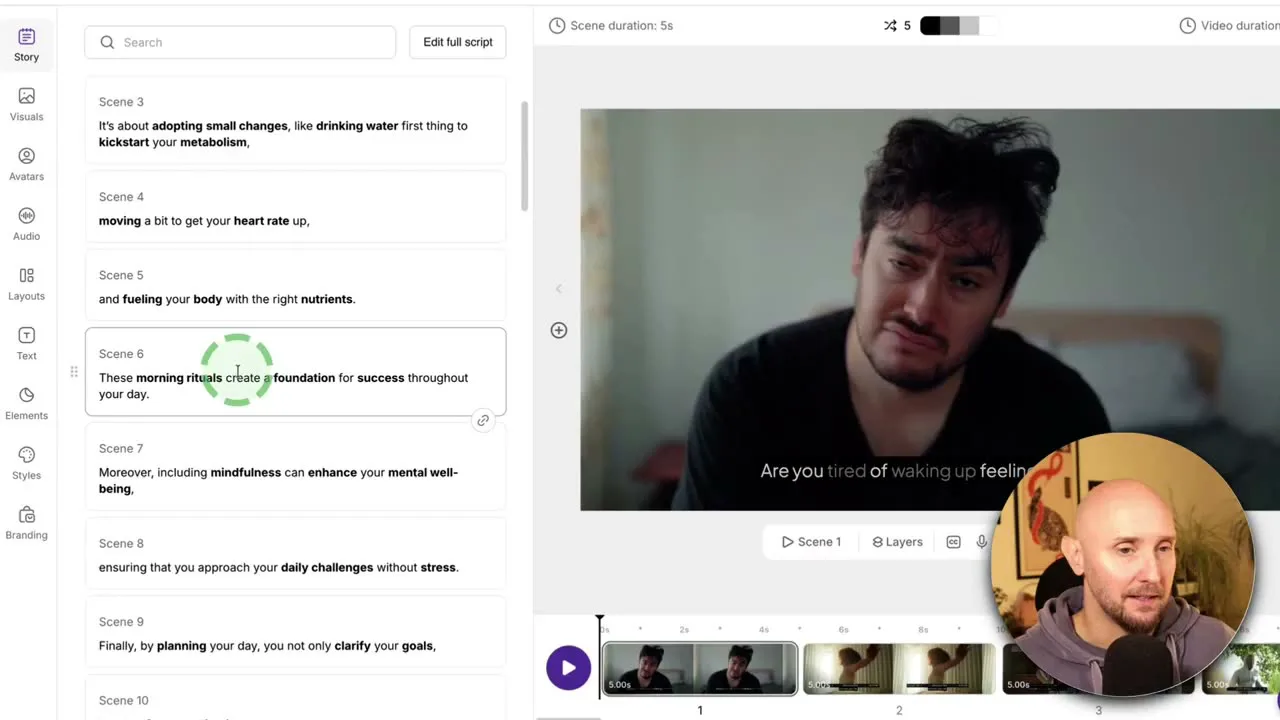
Within that short demo, the actual matching held up reasonably well — the reviewer clicks through scene after scene checking the pairing against the script, and mostly approves of what came back.
These are actually matching the scenes in the story very well.
— Entrepreneur Nut, reviewing Pictory's scene matching
But he also flags the honest exception a paragraph earlier: Pictory “does actually do a really good job” most of the time, “but sometimes it does get things wrong” — and shows exactly what fixing that looks like: open the scene, search the stock library by hand for a better clip, or hand the AI a fresh prompt to generate a replacement image for that one slot.
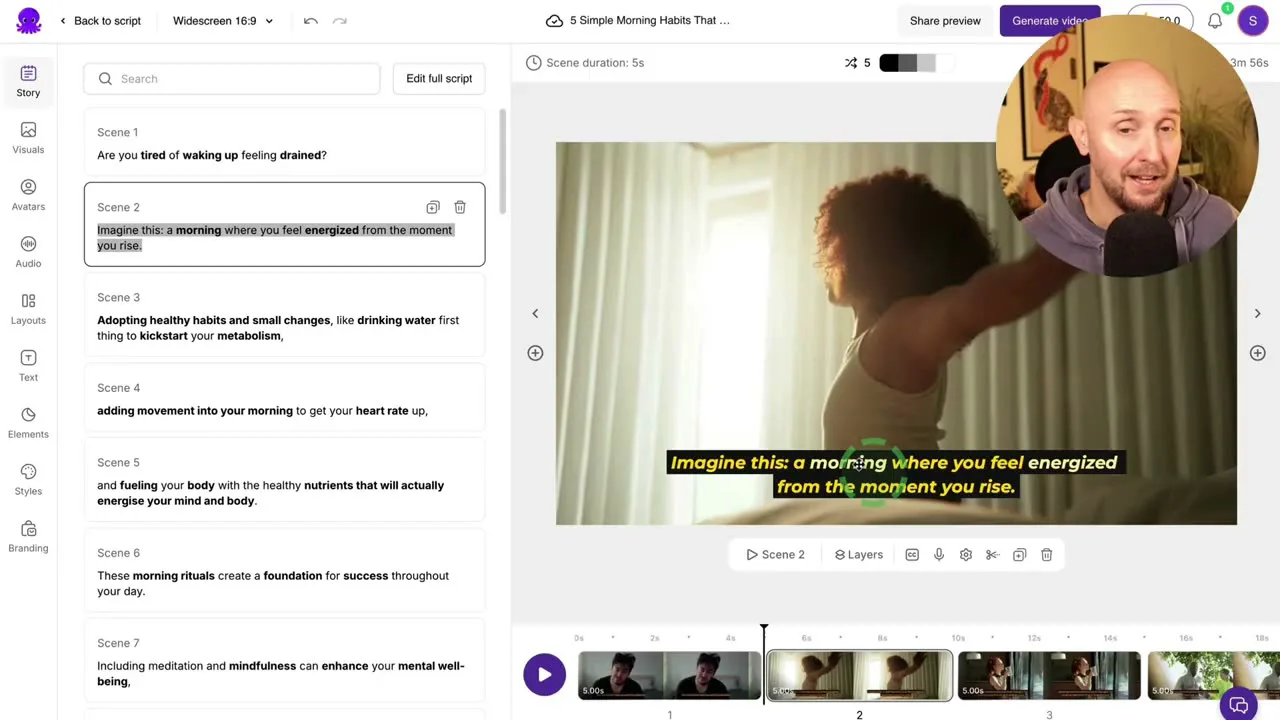
That per-scene review-and-swap loop is the real workflow, and it’s perfectly reasonable at 9 scenes across a 3-minute video. It doesn’t change shape at 240 scenes across a 20-minute one — it’s still one scene, one search, one click, repeated 26 times more often, with no per-scene review built into the tool’s own workflow to tell you which of the 240 need it. Creators talking about this online land on the same complaint from a different angle: several report a month’s credit allotment getting used up on a single attempt at a longer render, or a render stalling with repeated requests for more credit before it finishes — the length problem shows up as a billing problem before it shows up as a quality one.
Three tools, how each actually segments a script
Pictory
Sentence-by-sentence, 3M+ visual library
- One scene per sentence or per line break
- Visual auto-matched from a 3M+ stock library
- One-click manual swap, or an AI-generated replacement per scene
- Runtime set by a dial, not driven by script length
Best for: Short explainers under ~5 minutes where someone reviews every scene by hand.
InVideo
One prompt, 16M+ clip library
- One-prompt draft from a script or idea
- "Sifts through 16m+ stock images and videos"
- 2.0 added cross-scene coherence to the ranking
- Credit-metered — reviewers report renders stalling on longer scripts
Best for: Fast social cuts and short drafts, credit budget permitting.
Fliki
Stock + AI b-roll blend, plan-gated length
- Segments by sentence rhythm, topic shift, and pacing
- Stock footage, AI-generated clips, or your own brand assets per scene
- Free plan caps renders under 15 minutes
- 10–15 min render time for a 5–15 minute finished video
Best for: Creators who need voice/language variety first, visuals second.
Generic script-to-video tool vs. a purpose-built long-form pipeline
None of the tools above are badly built — they’re built for what most script-to-video searches actually want: a short video, fast, from a rough idea. The difference shows up specifically at the length and revision behavior a real YouTube script needs.
| Generic script-to-video tool | Purpose-built long-form pipeline | |
|---|---|---|
| How a scene gets its visual | Keyword search against a tagged stock library, per sentence | Generated image tied to a locked character/style reference |
| Consistency across scenes | Different stock people, settings, and lighting every clip unless hand-corrected | Same reference character and world held across the whole episode |
| Reviewing 200+ scenes | One scene, one manual check, no built-in flag for what needs a look | Regeneration scoped automatically to the scenes tied to changed script lines |
| Editing one script sentence | Re-open that scene by hand, search or re-prompt a replacement | Script-line-to-scene mapping re-generates only the affected scene |
| Narration timing | Voice added or matched roughly, trimmed to fit in an editor | Scene duration measured from actual narration length per sentence |
| Length limits | Plan-gated — free tiers cap under 15 minutes; credits can exhaust on one long render | No plan-based length cap — cost scales with what actually generates |
What to use when
If the video is 90 seconds and the script is a paragraph, any of the three tools above will get you a usable draft faster than editing by hand — that’s a real, honest use case and not what this article is arguing against. The distinction is length and revision, not quality of any single generated image.
Once the script is a real 10–25 minute YouTube video — the length a long-form video on YouTube actually runs — a stock-matched, sentence-by-sentence tool with no memory of which scene came from which script line stops being a shortcut and starts being a second full-time job: reviewing 250 scenes, manually swapping the ones that drifted, and re-touching all of it by hand every time a line changes. That’s the specific gap Longform Studio is built to close — not a faster stock search, but a pipeline where the script is the source of truth the whole way through: scenes generated from the script with a consistent character held across all of them, ElevenLabs narration measured against actual sentence length, and editing one line in the script flags only the one or two scenes tied to it for regeneration, not the other 248. For the fuller case on why clip-generation tools like Sora and Veo hit a different wall at this length, see the long-form AI video generator breakdown.
None of this replaces having a script worth turning into video in the first place. If you’re still at that stage, start with how to write a video script that holds attention or, for the YouTube-specific structure, a YouTube script template with hooks and chapters. If you don’t have a script at all yet and want AI to help write one first, the buying criteria for a YouTube script generator cover that earlier step. And for the full path from channel concept through production, the complete faceless video production guide is the wider map this article sits inside.
FAQ
What does "script to video AI" actually mean?
It's software that takes a finished text script and automatically produces a video from it — segmenting the script into scenes, matching or generating a visual for each one, adding narration and captions, and rendering a final file. Tools like Pictory, InVideo, Fliki, and Kapwing are the most common examples, and most work by matching each sentence against a stock footage or image library.
Can script-to-video tools handle a 20-minute YouTube script?
Technically some allow it on paid plans, but the underlying mechanism — segmenting by sentence and matching each one to stock footage — doesn't change as the scene count grows into the hundreds. Free tiers cap well below that length (Kapwing at roughly a minute, Fliki under 15 minutes), and reviewers report credits exhausting mid-render on longer attempts even on paid plans.
Why doesn't the stock footage match my script?
Most tools search a tagged stock library by keyword for each sentence, the same way a stock site's own search bar works. That finds footage tagged with the nouns in a sentence, not footage that fits the story building across several scenes — so specific, concrete language in the script tends to match better than abstract phrasing.
What's the difference between script-to-video AI and a long-form AI video generator?
Script-to-video tools like Pictory or InVideo match a finished script to existing stock footage, scene by scene. A long-form AI video generator instead generates original scenes from the script with a consistent character or style held across the whole video, and tracks which scene came from which script line so a rewrite only regenerates what changed.
How much does script-to-video AI cost for a full-length video?
It depends on the tool and plan, but most price by credits or a monthly render allotment rather than a flat per-minute rate, which makes the real cost of a long video hard to predict up front. Several users report a month's credit allotment consumed on a single attempt at a longer render, or a render repeatedly requesting more credit before finishing.
Your script deserves more than a keyword search
A script-to-video tool that searches stock footage by keyword works fine at 90 seconds. At 20 minutes and 250 scenes, it's a second full-time job. Longform Studio treats the script as the source of truth the whole way through — consistent characters, narration measured to the actual sentence, and one line edited means one scene regenerated, not the whole episode.
Start with Longform Studio$49/month plus the real per-dollar cost of what gets generated — no credit balance to guess at.