
AI Tools for YouTube Automation: What You Actually Need
The minimal AI tool stack for YouTube automation, organized by what each tool must produce — plus the subscriptions gurus push that you can skip.
Somewhere in a course community right now, someone is pasting a screenshot of their tool stack: a script generator, a voice clone tool, a stock footage library, a thumbnail A/B tester, a trend-spotting dashboard, a repurposing tool, an analytics overlay, and a "content calendar AI." Eight subscriptions, maybe $250 a month, before a single video is published. The course sold the stack, not the channel.
Most of those tools don't move the needle. A handful do, and they map cleanly onto the four things a long-form video actually needs: a script, images or footage, narration, and an edit. If a tool doesn't produce one of those four outputs, it's optional at best.
This is the difference that matters when you're evaluating ai tools for youtube automation: some of them automate production — the mechanical work of turning a script into a rendered video. That part is genuinely faster with AI than it was five years ago. But no tool automates judgment — deciding what topic is worth 12 minutes of someone's attention, checking that a claim in the script is actually true, watching the final render before it goes live. Sell that part off and you get a channel that looks automated because it is, and YouTube's monetization review can tell the difference.
Key Takeaways
- A long-form video needs exactly four tool outputs — script, images, narration, edit. Everything else is optional.
- Course-sold tool stacks run ~8 subscriptions and ~$250/month before a single video is published.
- A real minimal stack runs $50–$75/month — ChatGPT Plus ($20), Midjourney Basic/Standard ($10–$30), ElevenLabs Creator ($22).
- YouTube's 2025 rename to "inauthentic content" specifically targets mass-produced, templated video — the tools used don't change that verdict.
- Production automates. Topic selection, fact-checking, and the final watch-through don't — and reviewers can tell the difference.
The AI tool stack, by the numbers
8
subscriptions in a typical course-sold tool stack
$250/mo
cost of that stack before one video is published
4
outputs an AI tool stack actually needs to produce
$50–$75/mo
real cost of script, images, and narration, done minimally
The minimal stack, by what it has to produce
Ignore tool names for a second and start from outputs. A long-form video needs four things. Everything else is a nice-to-have.
A script
Sentence-level edits, not a raw chat window
This is the one people underspend on and it shows. A general chat model can draft a script, but a raw chat window means copy-pasting research, losing track of sources, and re-prompting the whole document to change one paragraph. What you actually need is sentence-level editing and a record of where each factual claim came from — so you're not publishing a hallucinated statistic to 50,000 people.
- ChatGPT Plus, Claude, or Gemini — ~$20/mo tier
- Edit one line without regenerating the rest
- A record of where each claim came from
Best for: Anyone writing more than one script a month.
Images or footage
AI stills beat stock — if they hold consistency
For faceless long-form, this is almost always AI stills rather than stock or licensed clips — stock is expensive at scale and the same handful of clips end up in every channel in your niche. Midjourney produces strong images but with no way to keep a character or setting consistent across 40 scenes. That's the actual hard part: not "can AI make a picture," but can it make the same people and places look the same for 20 minutes straight.
- Midjourney: $10–$120/mo, GPU-hours dependent
- No built-in character/setting consistency
- A separate export step into your editor
Best for: Channels where stock footage keeps repeating.
Narration
ElevenLabs is the standard
ElevenLabs is the standard here, and the pricing is straightforward — Creator is enough for a single 15-minute episode a month. What matters beyond voice quality is timing — knowing how long each sentence actually takes to narrate so visuals can be cut to match, rather than guessing at pacing and fixing it in the edit.
- Free: 10,000 credits to test voices
- Creator: $22/mo, ~2 hrs of narration
- Pro: $99/mo for volume generation
Best for: One 15-minute episode a month — Creator tier covers it.
The edit
Where the automation gap has actually closed
Rendering a 20-minute video used to mean manual timeline work in Premiere or handing it to an editor. Cloud rendering pipelines can now assemble timed narration, synced images, and captions into a finished master without a human dragging clips on a timeline — but only after the first three ingredients are locked. An automated edit of a bad script is still a bad video, just faster to make.
- Assembles timed narration + synced images + captions
- No manual timeline dragging
- Only works once the first three are locked
Best for: Solo creators who don't want to hire an editor.
Longform Studio was built around exactly this pipeline — source-backed script writing with sentence-level edits, AI stills with consistent characters across scenes, per-scene regeneration when one shot is wrong instead of redoing the whole project, ElevenLabs narration with measured timing, and cloud rendering to a downloadable master — because the four-tool juggling act above is the actual bottleneck for solo creators, not a lack of raw AI horsepower. If you're evaluating ai tools for a faceless YouTube channel broadly, the question to ask of any tool is which of these four outputs it produces, and whether it hands off cleanly to the next step or dumps you back into copy-paste.
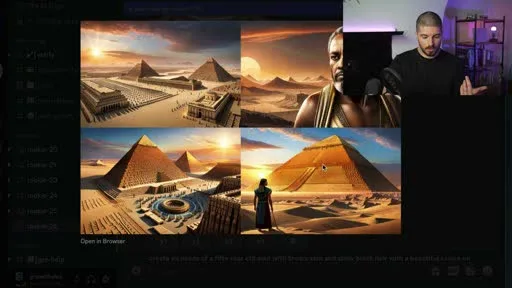
You can watch the workaround creators actually use, live: in his walkthrough of a full YouTube-automation video build, Grow with Alex (~230K subscribers) generates a batch of thumbnail options in the free Discord tool Blue Willow, gets back a 2×2 grid of ancient-Egypt pyramid scenes, and picks the one tile that looks closest to what he wanted — there's no way to lock the style or the scene across the rest of the video, just a manual pick from whatever the generator returns that round.
What to skip
These categories get pushed hard in automation courses because they're easy to demo and easy to sell as "passive income unlocked." Most solo long-form creators don't need them.
SKIP
Trend-prediction dashboards
By the time a trend shows up in a dashboard, it's already priced into the algorithm.
SKIP
Auto-posting and scheduling suites
YouTube's own native scheduler is free and does this already.
SKIP
"Niche finder" AI
If a tool can name your niche in ten seconds, so can every other subscriber to that tool.
SKIP
Faceless-avatar generators for long-form
Nobody is watching a static talking avatar for 15 minutes straight.
SKIP
Bulk repurposing tools
The fastest way to trip YouTube's inauthentic content policy on templated uploads.
SKIP
SEO keyword suites beyond the basics
Past the free tier, you're paying for dashboards restating what your retention graph already told you.
Bulk repurposing tools deserve a harder callout than a one-liner: turning one video into fifty is the fastest way to trip YouTube's inauthentic content policy, which flags "content that appears to be produced using a template" and videos where each upload doesn't deliver its own creative or educational value, per YouTube's monetization policies. One good long-form video is worth more than fifty templated clips of it.
The pattern across all six: they promise to replace a decision, not perform a task. A tool that renders your narration faster is production automation. A tool that tells you what to make a video about, or that mass-produces videos on your behalf without a human checking each one, is trying to automate judgment — and that's the part that isn't actually for sale.
This is also the verdict from the creator side, not just the policy side. In the same walkthrough referenced above, Grow with Alex tests the exact category of tool this article is telling you to skip — the "generate a whole video" services like InVideo and Pictory — and calls the output quality not great. His actual production stack in the video is closer to the minimal one above: ChatGPT for the script, a free built-in text-to-speech tool for narration, free stock footage sites for visuals, and manual editing in CapCut — cheap or free tools doing one job each, not a single AI service claiming to do all four.
Anyone claiming you can press one button and get a finished automation video is lying — and videos built that way won't get monetized.
— Grow with Alex, on one-button “generate a whole video” tools
Why judgment can't be outsourced
YouTube didn't rename its "repetitious content" policy to "inauthentic content" in 2025 by accident. The updated language is explicit about mass-produced and templated content — video that "gives the impression of mass production" or lacks the creator's "original, authentic insights or perspective" is ineligible for monetization, full stop, regardless of how it was made. That's not a rule against AI tools. It's a rule against outsourcing the part of the job that decides whether a video deserves to exist.
In practice this means someone — you — has to do three things no subscription can do for you: pick the topic because you understand what your specific audience actually wants next, not because a tool ranked it highest; read the script before it renders and catch the sentence that's technically true but misleading, or just flat wrong; and watch the finished video, not just skim the thumbnail, before it goes live. A channel that skips all three and only automates the mechanical steps is running a content farm with better production values. Reviewers, and eventually viewers, notice the difference between videos with a point of view and videos that pattern-matched one.
If you're still deciding whether the model works at all before you build a stack around it, that's a separate question from tooling — see what YouTube automation actually is and how to start for the groundwork. The tool question only matters once you've answered that one.
Production vs. judgment
Every tool on this page speeds up production — turning a locked script into a rendered video faster than a human alone could. None of them replace judgment: picking the topic, fact-checking the script, watching the final render before it publishes. Buy tools for the first job. Keep the second one yourself.What a real starting budget looks like
For one long-form video every one to two weeks, solo:
| Output | Tool example | Monthly cost |
|---|---|---|
| Script | ChatGPT Plus or equivalent | $20 |
| Images | Midjourney Basic/Standard | $10–$30 |
| Narration | ElevenLabs Creator | $22 |
| Edit + render | Manual or a dedicated pipeline | Varies |
That's roughly $50–$75/month for script, images, and narration alone before you've solved the hand-off between them — the copy-paste, re-export, re-sync work that eats the time savings the tools promised. That gap is exactly what an all-in-one production environment like Longform Studio is for: one workspace where the script, images, narration, and render stay connected, with production costs shown in real dollars instead of opaque credits, at $49/month plus what you actually spend generating.
Whether you run separate subscriptions or a connected pipeline like Longform Studio's research-to-render workflow, the four-output framework above still applies — it's the fastest way to tell whether a tool earns its subscription or is just another line on the course-sold stack.
FAQ
What AI tools do I actually need for YouTube automation?
Four categories cover it: a script tool with sentence-level editing and source tracking, an image generator that can hold a consistent character or setting across a video, a narration tool with accurate timing (ElevenLabs is the standard), and a way to assemble the render without manual timeline work. Everything outside those four — trend dashboards, niche finders, bulk repurposing — is optional.
Is YouTube automation with AI tools against YouTube's rules?
No, but mass-produced or templated content is ineligible for monetization under YouTube's inauthentic content policy. Using AI tools to produce a video is fine; skipping the human judgment on topic selection, fact-checking, and final review is what gets flagged, whether or not AI was involved in making it.
How much should an AI YouTube automation stack cost per month?
A working minimum for script, images, and narration runs roughly $50–$75/month on separate tools (ChatGPT Plus, Midjourney Basic or Standard, ElevenLabs Creator), before accounting for the time cost of moving files between them. All-in-one platforms bundle this closer to a single subscription plus per-video production costs.
Can AI fully automate a YouTube channel without a person involved?
Not one that stays monetized. YouTube's policies specifically target content that lacks a creator's original insight or appears templated, and channels that skip human review on topic choice and script accuracy tend to produce exactly that pattern. AI can automate the production steps; someone still has to decide what's worth making and check it before it publishes.
Do I need separate subscriptions for script, voice, and images, or is one tool enough?
Either works, but separate best-in-class tools mean manually exporting and re-importing between each step, which is where automation stacks actually lose time. A single connected pipeline, like Longform Studio's research-to-render workflow, removes that hand-off without forcing you onto a lower-quality voice or image model to get it.
Four outputs. One place that produces all of them.
This article's whole argument is that a long-form video needs four outputs, not eight tools. Longform Studio connects the four that matter — script, images, narration, render — in one workspace, with real dollar costs instead of opaque credits.
Try Longform StudioNo markup on provider usage.