
How to Make a Long-Form YouTube Video Without Filming
How to make a long form video on YouTube: the real hour cost of script, voice, visuals, and edit, plus three routes compared by time and dollars.
Ask ten people how to make a long form video on YouTube and nine of them will start filming something. The tenth one already tried that, quit around hour six of editing, and is now looking for a way to do this without a camera. This article is for the tenth person.
Here’s the number that explains why so many first attempts die before they publish: editing a 20-minute video takes roughly 10 to 20 hours for a competent editor working alone, and can run past 30 hours if the footage is dense or the style is highly produced. That’s editing time only — after the script is written, the voice is recorded, and the visuals exist. Add those stages and a single 20-minute video traditionally costs a person 20 to 40+ hours of work before it’s watchable. Most people who “try long-form” are budgeting for a Saturday afternoon. They hit the effort cliff, and the channel dies at video two.
None of that time is optional busywork you can skip by trying harder. It’s the actual shape of the job. The fix isn’t motivation — it’s understanding where the hours go, and picking a route that removes the ones that don’t need a human.
Key Takeaways
- A 20-minute video traditionally costs 21–40+ hours: 6–10 for script, 1–2 for voice, 4–8 for visuals, 10–20 for edit.
- Editing is the single biggest block — up to 30+ hours for a heavily produced style — and the one people try to shortcut first.
- Ali Abdaal spent roughly 12 hours scripting one video and 10 hours a week editing before he outsourced it.
- Hiring an editor doesn't remove hours, it moves them: $40–$500 per video plus wait time.
- An AI-assisted pipeline compresses the same video to roughly 4–8 hours by replacing search-and-assemble with generation.
How to make a long form video on YouTube: the four production blocks
Every long-form video, regardless of format, is built from the same four blocks. Skipping one doesn’t make the video faster — it makes it worse.
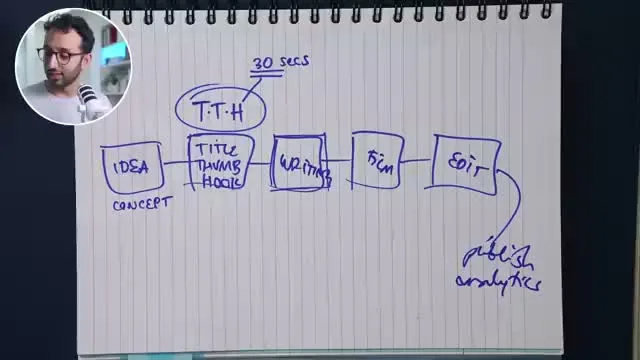
That’s the same four-block shape creator Ali Abdaal sketches on a whiteboard in this Think Media interview — idea, writing, film, edit, publish — and he’s blunt about which block actually eats the clock.
Script and research
A 20-minute video runs about 2,600–3,000 words of narration at a typical spoken pace of roughly 140–150 words per minute. Writing that from a blank page — research, structure, drafting, a revision pass — commonly takes 6–10 hours for someone who knows the topic. Less if you’re recycling a format you’ve written before; more if the topic needs source-checking, which it should if you want the video to hold up.
Scripting a video word-for-word to read off a teleprompter took roughly 12 hours — enough that I switched to bullet points instead.
— Ali Abdaal, on Think Media
That’s a real number from Abdaal: a fully-scripted video was pushing his personal script time past this article’s 6–10 hour estimate for a competent writer, which is exactly why he stopped writing full scripts.
Voice
If you’re recording yourself: budget 1–2 hours for a 20-minute script, because nobody nails 3,000 words in one take — you re-read lines, fix mouth noise, redo a paragraph where you stumbled. If you’re hiring a voice actor, your hours drop close to zero but you’re now paying per finished minute and waiting on turnaround.
Visuals
This is the block traditional faceless channels underestimate. Sourcing stock footage or b-roll that actually matches 20 minutes of narration — searching, downloading, trimming, making sure nothing repeats too obviously — runs 4–8 hours even with a good stock subscription. Custom graphics or a consistent visual style add more.
Edit
The number from directly measured creator estimates: 10–20 hours for a 20-minute video, and up to 30+ hours for a highly-edited style with motion graphics, color work, and sound design layered in (tastyedits.com; gling.ai). This is the single biggest block, and it’s the one people most often try to shortcut — which is how you get a video that’s technically long-form but unwatchable.
Where the hours go on one 20-minute video
I was personally spending 10 hours a week on editing before I outsourced it — I valued my own time at roughly $15/hour and could hire an editor for about $10/hour, so every hour I kept editing myself was an hour I was paying myself less than market rate to do it.
— Ali Abdaal, Think Media interview
Ali Abdaal — a creator with a large educational YouTube channel who’s since built a course business teaching creators — lands almost exactly on this article’s per-video estimate once you account for a weekly upload cadence. His math for why he stopped editing himself is the same math this article makes for hiring an editor.
Add it up and a realistic total for one 20-minute video, done the traditional way, is 21–40+ hours. That’s not a beginner tax that experience erases; it compounds with production value, because a more polished video needs more of every block, not less.
Three routes to make a long form video on YouTube, compared
There are three ways to actually get from idea to published video. One is off the table by definition here.
Route 1: Film yourself
Camera, lighting, a location, on-camera delivery, retakes. Excluded from this article on purpose — if you’re reading a piece titled “without filming anything,” you already know this isn’t your route. It’s mentioned only because it’s the implicit default everyone else compares against, and it doesn’t remove any of the four blocks above — it adds a fifth (filming) on top of them.
Route 2: Traditional faceless — stock footage plus a hired editor
You write the script yourself or contract it out, record or hire a voiceover, license stock footage on a subscription, and either edit it yourself or hire an editor. A stock footage subscription runs about $16.50/month for Envato Elements’ entry plan with unlimited downloads (elements.envato.com). Editors are priced by channel stage: $10–$40 per video for a beginner editor on a new channel, $40–$150 for the “sweet spot” intermediate range most established faceless channels use, and $150–$500+ for agency-level work (packapop.com).
This route removes the camera and the filming hours, but it keeps everything else — script, voice, sourcing, and either your editing hours or someone else’s invoice. It’s a real route. It’s also still 20+ hours of somebody’s time per video, just split differently depending on what you outsource.
Fascinating Horror (~1.45M subscribers) is a working example of this route at scale: narration over licensed stock and archival footage, no on-camera presenter, a new disaster-documentary video roughly weekly. It’s the traditional-faceless formula this section describes, run consistently enough to build a channel most people would recognize.
Route 3: AI-assisted pipeline
Script drafted and edited in the same workspace as research, narration generated from text instead of recorded, images generated to match each sentence instead of sourced from a stock library, and a render that assembles automatically once the pieces exist. The hours don’t disappear — they compress, because generation replaces search-and-retake. A script pass becomes an editing pass on AI-drafted text (1–2 hours instead of 6–10 spent writing from scratch). Voice becomes a generation-and-listen pass instead of a recording session. Visuals become prompting and selecting instead of searching a stock library scene by scene. The edit becomes reviewing a synced preview instead of assembling one from raw clips.
This is the case for a long form video editor built specifically for this — not a general editor with an AI plugin bolted on, but a pipeline where regenerating one scene doesn’t mean re-touching the other nineteen minutes.
Traditional faceless
Stock footage + your own or a hired editor
- Script written from scratch
- Stock footage subscription
- DIY or hired edit
- 20+ hours, or $40–$500 per video
Best for: Creators who want full manual control over every stock clip and don't mind the hours or the invoice.
AI-assisted pipeline
Longform Studio: research, script, voice, visuals, edit
- Research, script, storyboard in one workspace
- ElevenLabs narration generated from text
- Consistent AI visuals, per-scene regeneration
- 4–8 hours, real dollar cost shown per video
Best for: Creators who want the same 20-minute video without stitching five tools together.
What the hours and dollars actually look like
Laid side by side, the four routes split the same work in different places — some remove hours, some just move them to someone else’s invoice.
| Route | Script | Voice | Visuals | Edit | Total hours | Cost per video |
|---|---|---|---|---|---|---|
| Film yourself | 6–10 hrs | included in filming | filming + b-roll | 15–30 hrs | 30–60+ hrs | Camera/lighting gear, location |
| Traditional faceless (DIY edit) | 6–10 hrs | 1–2 hrs | 4–8 hrs | 10–20 hrs | 21–40 hrs | ~$16.50/mo stock subscription |
| Traditional faceless (hired editor) | 6–10 hrs | 1–2 hrs | 4–8 hrs | 0 hrs (outsourced) | 11–20 hrs + wait time | $16.50/mo stock + $40–$500 editor fee |
| AI-assisted pipeline | 1–2 hrs | 0.5–1 hr | 1–3 hrs | 1–2 hrs (review) | 4–8 hrs | Tool subscription + per-video generation cost |
The pattern to notice: hiring out the edit doesn’t remove hours from the video, it moves them to someone else’s clock and adds a dollar cost plus a wait. The AI-assisted route is the only one that actually shrinks the total, because generation is faster than search-and-assemble at every one of the four blocks, not just editing.
Voice narration is a useful illustration of that compression. Generating roughly 3,000 words of narration for a 20-minute video takes minutes, not a recording session, and fits comfortably inside a mid-tier text-to-speech plan — ElevenLabs’ Creator tier, for example, covers 100,000 characters a month for $22, enough for several videos’ worth of narration (vendr.com). The generation itself isn’t the hard part anymore; reviewing it for pacing and fixing the sentence that landed wrong is.
The real cost of one 20-minute video
21–40+ hrs
Traditional route: script, voice, visuals, edit
4–8 hrs
Same video, AI-assisted pipeline
$22/mo
ElevenLabs Creator tier — 100,000 characters of narration
Sources: vendr.com
None of this makes long-form free. It makes the honest comparison possible: 20–40 hours of human time per video with stock footage and a hired or DIY edit, versus a workspace where the same video is a handful of review passes stitched into a render. If you’ve read what actually counts as a long-form video on YouTube and you’re deciding whether the traditional route or an AI video generator built for long-form is the better fit for your channel, the hour math above is the actual decision — not preference, the clock.
Try it without hiring anyone
If the 21–40 hour version is what’s stopped you from publishing consistently, Longform Studio is built to take a script from idea to a rendered 8–30 minute video without a camera, a stock footage subscription, or a hired editor — sourced research, sentence-level script editing, consistent AI visuals with per-scene regeneration, and narration in one workspace, priced at $49/month plus the actual dollar cost of what you generate. It’s worth reading the fuller breakdown of how to make faceless YouTube videos if you’re still deciding which pieces of the pipeline you want to control yourself.
FAQ
How long does it actually take to make a 20-minute YouTube video?
Traditionally, 21–40+ hours: 6–10 for script and research, 1–2 for voice, 4–8 for sourcing visuals, and 10–20+ for editing, based on directly measured creator estimates for a 20-minute finished video. An AI-assisted pipeline compresses that to roughly 4–8 hours because generation replaces search-and-assemble at each stage.
Is a long form video editor different from a regular video editor?
Functionally, yes, once AI generation is involved. A traditional editor assembles pre-existing clips; a long form video editor built for AI production also has to handle sentence-level script timing, per-scene image regeneration, and syncing narration to visuals — regenerating one scene without re-touching the rest of a 20-minute timeline is the feature that traditional editors don't need and AI-native ones do.
Can I make long form content without ever filming myself?
Yes — that's the entire premise of the faceless format, traditional or AI-assisted. Traditional faceless channels combine narration with licensed stock footage; AI-assisted pipelines generate the visuals to match the script directly. Neither requires a camera, a face, or a location.
What's the cheapest way to make a long form video on YouTube?
In dollars, DIY traditional faceless is cheapest up front — a stock footage subscription around $16.50/month plus your own time. But "cheap" ignores the 21–40 hours of unpaid labor per video, which is the actual cost most people underestimate. Measured against your own hourly value, an AI-assisted pipeline that cuts the same video down to 4–8 hours is often cheaper in practice, not just faster.
Why do most people quit making long-form videos after one or two tries?
The effort cliff: people budget an afternoon and the job takes 20–40 hours. The gap isn't a skill problem that disappears with practice — editing time scales with production value, so getting better at making videos tends to increase the hours per video, not reduce them, unless the production method itself changes.
Turn the 40-hour video into a few review passes
This article just walked through where 21–40 hours go on one video — script, voice, visuals, edit. Longform Studio takes the same 20-minute video from idea to rendered file in roughly 4–8 hours of review passes, not a second job.
Try Longform Studio$49/month plus the actual dollar cost of what you generate — no markup on provider usage.