
How to Write a Video Script (Structure, Length, Examples)
How to write a video script that holds attention: structure, pacing, hooks, and length math — with a worked example and a copyable template.
Key Takeaways
- A script has one job before minute one: open a loop in the first 10–15 seconds, and don’t close it early.
- Write to a words-per-minute budget, not a page count — 125–150 wpm is the working range for narrated video, verified against speaking-rate data, not a house rule someone made up.
- Re-opening a curiosity loop at 60–70% of the runtime is the exact fix Think Media’s Nolan Molt uses in his own scripts to fight the mid-video drop-off.
- Two-column AV format and single-column narration style solve different problems — most single-creator explainers only need one of them, not both.
- The read-aloud test catches more real problems in five minutes than a second silent read-through catches in twenty.
Most video scripts fail before anyone presses record. Not because the idea is bad — because on the page it reads fine, and out loud it drags, or the first line doesn’t earn a second one. Learning how to write a video script that survives contact with a real viewer comes down to three checks: does the opening open a loop, does the pacing match a spoken word count instead of a felt one, and does it survive being read aloud, not just read.
This guide covers the platform-agnostic craft — structure, length math, format, and a worked example — for any narrated video, long or short, YouTube or otherwise. It’s the same craft that sits underneath the scripting stage of producing a full long-form YouTube video. If you’re specifically optimizing for YouTube’s retention curve, chapters, and algorithm signals, the companion guide on how to write a YouTube script covers that layer on top of what’s here.
The pacing math behind a script that survives being read aloud
125–150
Words per minute — the working range for narrated video
60–70%
Where to re-open a loop to fight the mid-video sag
~1,100
Words needed to fill 8 minutes at that pace
Sources: National Center for Voice and Speech data, via VirtualSpeech · Think Media — How to Write a Script for a YouTube Video
Video script structure: hook, setup, payoff, repeat
Every format — YouTube explainer, corporate training video, TikTok voiceover, documentary narration — runs on the same underlying video script structure: a hook that opens a loop, a body that pays off small loops while opening new ones, and a close that pays off the last one and asks for something. Swap the vocabulary — cold open, promise, act break, call to action — and it’s the same shape.
The mechanism underneath it is the open loop: plant a question the viewer wants resolved, then don’t resolve it immediately. Screenwriters have a name for the same move — a setup-and-payoff pair — plant a detail early, let it pay off later, with real distance between the two so it doesn’t read as plain cause and effect. The practical version of the advice is to work backward: know the ending you want a viewer to land on before you write the opening, then plant only what leads there.
Read that as three overlapping windows, not three separate scenes. Loop 1 is the promise in your title or thumbnail — plant it in the first line, don’t pay it off until near the end. Loop 2 is smaller and planted mid-script, closed a few minutes later; its job is to survive the sag in the middle third, which is where most real-world drop-off happens, not in the first ten seconds people already blame. Loop 3 is a re-hook, and it’s the one most first-time scripts skip entirely.
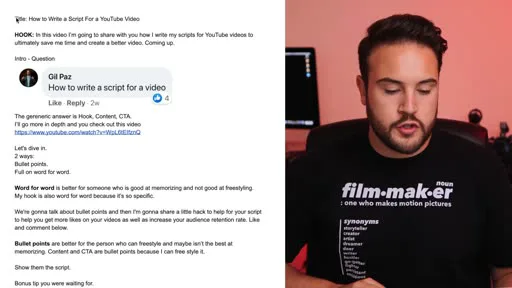
the hook, the content, and then the call to action
— Nolan Molt, Think Media
That’s Think Media’s Nolan Molt describing the base shape of his own YouTube scripts. His actual technique goes one step further than the generic version: he re-opens a loop roughly 60–70% of the way through a video — telling the audience something is still coming — and lands a second, softer call to action around the 75% mark, asking for a like or a comment rather than a subscribe. Both numbers come from his own scripts, not a rule he read somewhere; you can see the actual document, split into hook, bullet-point body, and a bonus-tip note, below. (If you’d rather reverse-engineer an existing video than write from a blank page, see how to get the script of a YouTube video to pull one apart first.)
How long should it be? The words-per-minute math
“How long should this script be” is really “how many words fit in the runtime I want,” and that’s a words-per-minute problem, not a guess. Conversational English runs close to 150 wpm on average. Narrated video is generally scripted slower than that — most guidance lands in the 125–150 wpm band, andone widely cited breakdown recommends aiming closer to 140 wpm even for a fast-paced one-minute explainer, specifically to leave room for pauses and emphasis rather than adding time for them afterward.
| Target length | At 130 wpm (unhurried, explainer) | At 150 wpm (brisk, conversational) |
|---|---|---|
| 1 minute | ~130 words | ~150 words |
| 3 minutes | ~390 words | ~450 words |
| 5 minutes | ~650 words | ~750 words |
| 8 minutes | ~1,040 words | ~1,200 words |
| 12 minutes | ~1,560 words | ~1,800 words |
| 20 minutes | ~2,600 words | ~3,000 words |
The trap: writing at the speed you talk when you're nervous
Most first-time scripts run long because the writer benchmarks against relaxed conversation, then reads it on camera 15–20% faster under pressure — which either rushes the delivery or blows the runtime. Script at the lower end of the range (125–130 wpm) for anything you’re not reading off a teleprompter, and let the higher end be a ceiling, not a target.This is also the fastest sanity check for a finished draft: paste it into any word counter, divide by your target wpm, and compare that to the runtime you promised in the title. A script that comes in 40% over word count isn’t a pacing problem to fix in the edit — it’s a structure problem, because something in the body isn’t earning its place. And if you’re not sure what runtime to write toward in the first place, that’s a separate question covered in how long a YouTube video should actually be.
The read-aloud test: the fastest edit in scriptwriting
A script that reads cleanly on the page and a script that sounds natural out loud are not the same document, and the gap between them is where most awkward, stumbling deliveries come from. The fix is mechanical, not artistic: read the whole thing out loud, at delivery pace, before you shoot — not skim it silently, actually speak it. Every sentence you stumble over twice is a sentence to cut or rewrite, not a delivery problem to practice through.
What the read-aloud pass actually catches
Sentences with two ideas stacked in one breath. Words that are fine to read but awkward to say (tongue-twisters, consonant clusters). Any line where you have to re-read the punctuation to know where the pause goes. All three are invisible on a silent read and obvious the moment you speak them.This is also where a sentence-level editor earns its keep instead of just being a nice-to-have. In Longform Studio’s script step, you can rewrite a single flagged sentence and see the narration timing update immediately, instead of re-reading the entire page to guess whether the fix quietly broke your pacing math from the section above.
Video script format: two-column AV vs. narration style
Once the structure and length are right, format is just the container you write it in — and picking the wrong one for your workflow costs real time. There are two dominant conventions, plus a hybrid most solo creators actually use without naming it.
Narration style — word for word
Full sentences, written out completely
- Best for teleprompter or memorized delivery
- Slowest to write; most reliable for pacing
- Standard for solo YouTube, podcasts, audiobooks
Best for: Beginners, and anyone reading off a prompter.
Narration style — bullet points
Key phrases only; you freestyle the rest
- Fastest to write; needs practiced delivery
- Line length can vary a lot beat to beat
- What most experienced solo creators land on
Best for: Creators comfortable talking to a camera unscripted.
Two-column AV
Audio and visual planned side by side, in sync
- Standard for commercials, e-learning, documentary
- Forces visual planning before the shoot, not during
- Overkill for a single talking-head channel
Best for: Anyone directing B-roll, graphics, or a crew.
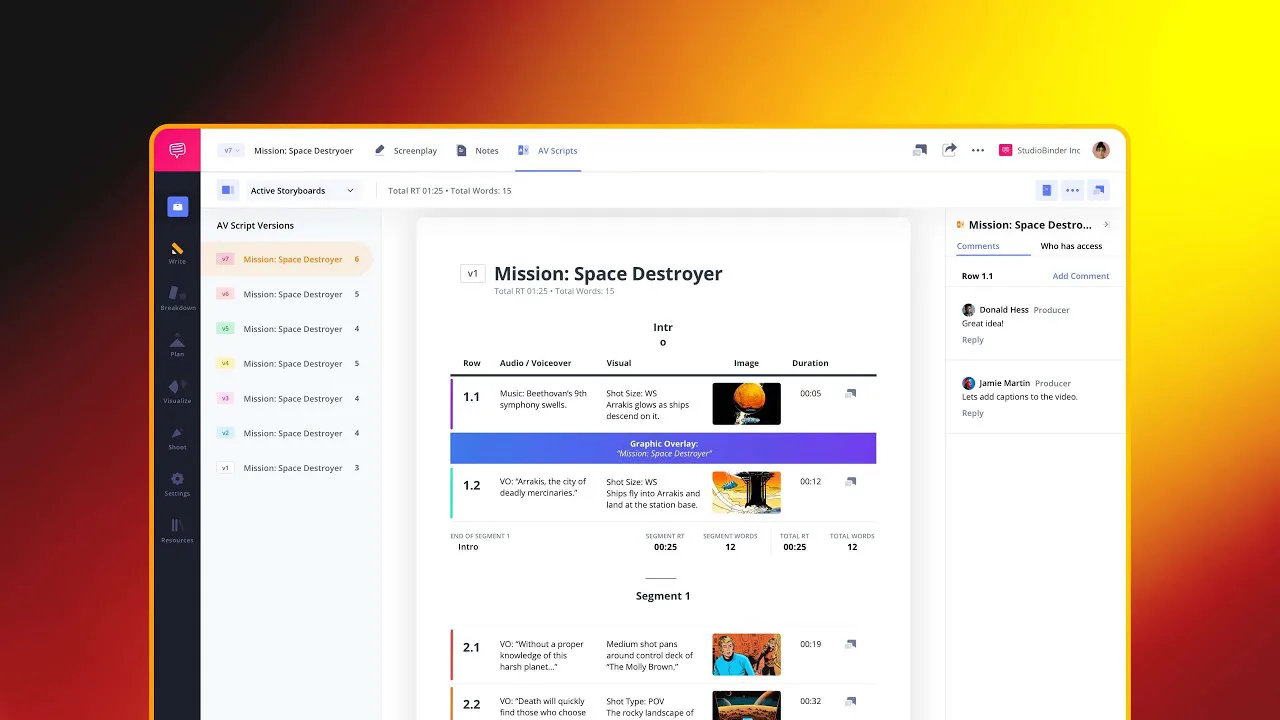
The two-column AV script lists visuals in one column and audio — narration, dialogue, music cues, sound effects — in the other, row by row, so every beat of sound is locked to what’s on screen at that moment. It’s the standard for TV commercials, corporate video, e-learning, and most documentary production, precisely because those all involve someone other than the narrator making shot decisions from the page (a fuller breakdown of the format is here). Below is an actual two-column AV script open in production software, for a fictional short — notice the row numbers, per-row word counts, and running duration total down the right side.
Copy this: a plain-text two-column starting template
You don’t need production software to use the format — two columns in a doc or spreadsheet does the job for a solo project. Copy this skeleton and fill in your own beats:
VISUAL                          AUDIO
-------------------------------- --------------------------------
[shot / graphic / B-roll]        [narration line, word for word
                                   or bullet point]
[on-screen text, if any]         [SFX / music cue, if any]
-------------------------------- --------------------------------
Row duration: __:__               Running total: __:__
A worked example: 40 seconds of a fictional explainer
Here’s the structure and format above applied to a single short beat, written for this guide — a fictional explainer on why spicy food makes your nose run. Read the narration column out loud to feel the pacing; at roughly 140 wpm it should land close to the seconds noted per row.
| Beat | Visual | Narration (~140 wpm) |
|---|---|---|
| Hook — 0:00 | Close-up: someone sneezes mid-bite, eyes watering | “One bite of a chili and your nose runs like a faucet. It’s not mucus reacting to spice. It’s not even really about heat.” |
| Open loop — 0:08 | Cut to a slow zoom on a single red pepper | “There’s one compound doing all of it — and it’s tricking your body into thinking it’s on fire.” |
| Setup — 0:15 | Simple animated diagram: a nerve pathway lighting up from tongue to brain | “Capsaicin binds to the same heat-sensing receptor your skin uses to detect an actual burn. Your brain can’t tell the difference.” |
| Payoff — 0:26 | Diagram adds sweat, tears, and nasal mucus glands activating at once | “So it orders every defense you have for a fire, all at once — sweat, tears, mucus. Not an allergy. A fire drill.” |
| CTA — 0:36 | Text overlay: next-video title card | “Next: why milk actually puts the fire out, and water just spreads it.” |
Notice what each beat is doing on top of what it’s saying: the hook opens Loop 1 (why does this happen) without answering it; the second line at 0:08 is a smaller open loop of its own (what compound); the payoff at 0:26 closes both at the same moment, which is what makes it feel earned rather than just informative; and the CTA opens one more loop on the way out the door, into the next video. Once a script like this is locked, turning it into stills, voiceover, and a synced edit is a separate production question — covered in how AI script-to-video tools actually handle that handoff.
Mistakes that quietly kill a video script
Most scripts that underperform aren’t badly written sentence by sentence — they’re structurally flat. The hook opens a loop and the middle just delivers information in order, with nothing else to stay for until the end. Fixing that is usually a matter of finding one fact in your existing draft that’s interesting enough to promise early and hold back, rather than adding new material.
- Read the whole script aloud at delivery pace, not silently
- Word count checked against your wpm target and target runtime
- At least one loop opened after the hook, not just at 0:00
- A re-hook or reminder planted somewhere past the halfway mark
- Every visual/graphic cue actually written down, not assumed
The other repeat offender is format mismatch: writing a full two-column AV script for a video you’re shooting alone with no B-roll plan, or writing loose bullet points for a corporate video a client and a crew both need to approve before the shoot. Match the format to who else has to read the script before you do, not to habit.
FAQ
How long should a video script be for a 10-minute video?
At the working range of 125–150 words per minute, a 10-minute narrated video needs roughly 1,250–1,500 words of spoken content. Budget the lower end if you're not reading from a teleprompter, since natural delivery includes pauses a flat word count doesn't.
What's the difference between a video script and a screenplay?
A screenplay follows strict scene-heading and dialogue formatting built for film and TV production crews. A video script is far less rigid — narration style (word for word or bullet points) or two-column AV format both work, and the right choice depends on whether anyone besides the narrator needs to plan shots from the page.
Should I write a video script word for word or use bullet points?
Word for word is more reliable for beginners, teleprompter use, and hooks specifically, since exact wording matters most in the first few seconds. Bullet points are faster to write and produce more natural delivery once you're comfortable freestyling in front of a camera — most experienced solo creators use bullet points for the body and write the hook out in full.
Do I need a two-column AV script for a YouTube video?
Usually not, if you're a solo creator shooting talking-head with light B-roll. Two-column AV format earns its overhead when a director, editor, or client other than the narrator needs to plan visuals from the page — commercials, e-learning, and crewed documentary work.
How do I make a script sound less scripted?
Read it aloud before shooting and cut or rewrite any sentence you stumble over twice — scripted-sounding delivery usually traces back to sentences that are readable but not speakable. Writing in bullet points instead of full sentences for anything but the hook also helps, since it forces natural phrasing instead of memorized wording.
Write the script once. Watch the timing update as you edit it.
Longform Studio's script step is built around sentence-level editing with measured ElevenLabs narration timing attached to every line — rewrite a sentence, see the runtime move, without re-reading the whole page to find out if your pacing math still holds.
Try Longform Studio$49/mo plus transparent per-dollar production costs. No markup on provider usage.