
Faceless YouTube Video Creator: From One Prompt to a Full Video
What actually happens between a prompt and a finished video in a faceless YouTube video creator — and why that visibility is what separates a creator from a generator.
Type one sentence into a faceless YouTube video creator and, twenty minutes later, an mp4 lands in your downloads folder. That part is real — dozens of tools do it now. What’s not real is the idea that nothing happened in between. A script got written. Scenes got planned. Images got generated, sometimes the wrong ones. A voice read words it may or may not have gotten right. Something decided how long each shot stays on screen. Every one of those is a decision, and the decision either happened where you could see it and correct it, or it happened in a black box and you’re stuck with whatever came out.
That’s the actual dividing line in this category in 2026, and it has nothing to do with how fast a tool is or how good its demo video looks. It’s whether the seven stages between “prompt” and “video” are exposed to you as checkpoints, or collapsed into a spinner. Walk through those stages one at a time and the difference stops being abstract.
Key Takeaways
- The dividing line between a creator and a generator is whether the seven stages between prompt and video are visible checkpoints or a single spinner.
- One-click generators often regenerate every scene to fix one sentence — silently overwriting frames you'd already reviewed and approved.
- Independent reviews of Pictory, InVideo, Fliki, Synthesia, and Lumen5 converge on the same complaint: inaccurate stock-footage selection nobody can fix before the render.
- YouTube's mid-2025 shift from “repetitious content” to “inauthentic content” makes unreviewed, template-driven output a monetization risk, not just a quality one.
- A realistic automation ceiling is 70–80%, with 20–40 minutes of real human time still going into the parts a script can't brute-force.
The anatomy of a faceless video, 2026
7
Stages between a prompt and a finished video — each one a decision point
70–80%
Realistic automation ceiling, per 2026 buyer's-guide roundups
20–40 min
Creator time still spent per video on the parts a script can't brute-force
1,000 / 4,000
Subscribers / watch hours YouTube requires for long-form monetization
Sources: YouTube Partner Program eligibility
Research, or the absence of it
Before a single word of script exists, a decision gets made about what the video is actually going to claim. A video about, say, a historical event, a scientific finding, or a company’s financials is only as good as what it’s built on.
A one-click faceless video generator skips this. You give it a topic — “the fall of the Roman Empire” — and it goes straight to script, because research is slow and research is where the tool would have to admit it doesn’t know something. The model fills gaps with whatever’s statistically plausible, which is exactly how faceless channels end up with confidently wrong dates, invented quotes, and stats that don’t trace to anything.
A tool built as a faceless video creator rather than a generator treats research as its own visible pass: it pulls sources, and you can see what they are before the script gets written on top of them. That’s the difference between a video with a bibliography behind it and one where nobody, including the person who published it, could tell you where a claim came from.
What a generator hides
Skips research outright; a topic goes straight to script, with the model filling gaps with whatever's statistically plausible.
What a creator shows you
A visible source pass — you can see what a claim is built on before the script is written on top of it.
The script, sentence by sentence
This is the stage every one-click tool compresses hardest, because a script is just text and text is cheap to generate. The problem is that a script for an 8-to-30-minute narrated video isn’t one block of text — it’s dozens of individual claims and transitions, each of which might need a tweak after you read it back.
In a faceless video maker that hands you a finished blob, fixing one wrong sentence means regenerating the whole script and hoping the rest doesn’t drift. In a tool built for editing, the script is addressable at the sentence level: you fix the one line that’s wrong, and everything downstream — timing, the shot tied to that sentence — updates around it instead of getting thrown out. That distinction sounds small until you’re twelve minutes into a script and find one factual error near the start. Regenerate-the-whole-thing tools make you choose between shipping the error or losing everything after it.
What a creator shows you
The script is addressable at the sentence level — fix the one line that's wrong and only the shot tied to it updates.
What a generator hides
Hands you a finished blob; fixing one wrong sentence means regenerating the whole script and hoping the rest doesn't drift.
The visual plan — the step most tools skip entirely
Here’s where the anatomy really splits. A script tells you what’s said. It doesn’t tell you what’s on screen, and for a long-form video that’s not one decision, it’s dozens: which sentence gets a new image, which sentences share one, whether a shot is a wide establishing frame or a close detail.
A one-click faceless video generator either skips this planning step outright — stock footage keyed to loose keyword matches — or does it invisibly, so the first time you see the shot list is when it’s already baked into a rendered video. If shot 14 doesn’t match what’s being said, your only recourse is to regenerate the whole thing and hope the model does better this time.
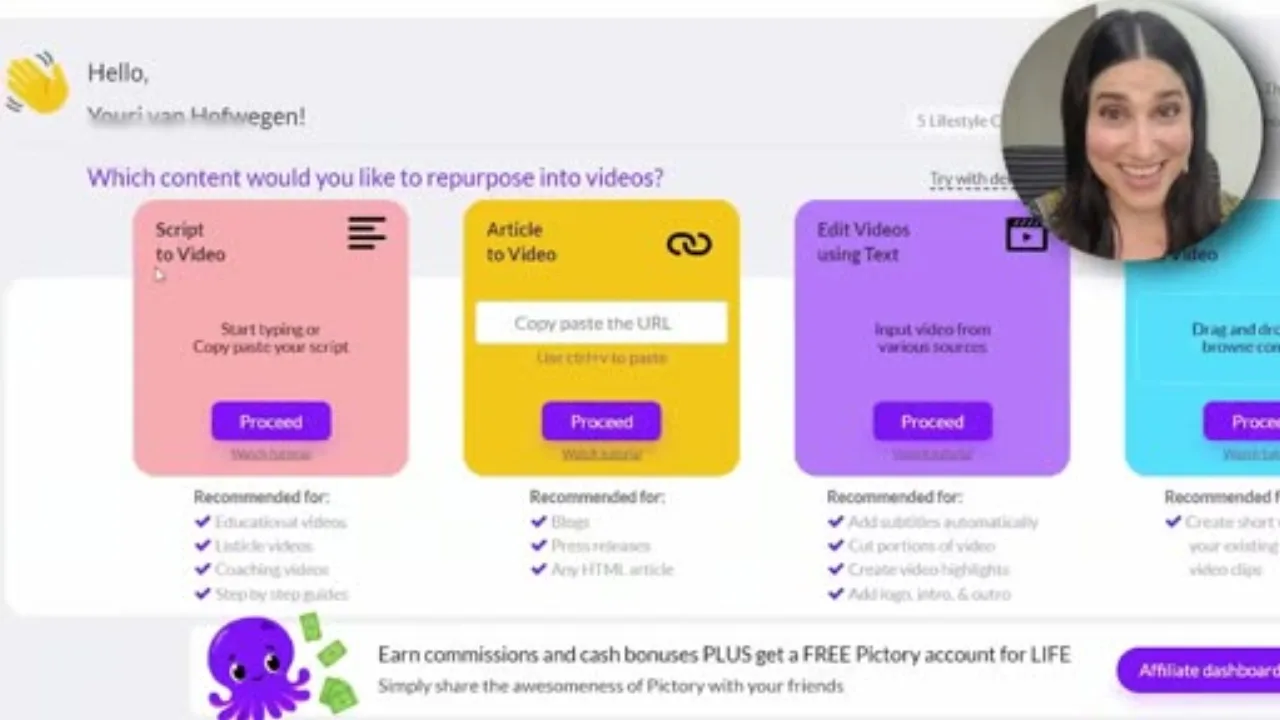
This is the entire planning interface in a typical generator: pick “Script to Video” or “Article to Video,” paste text, click proceed. There’s no intermediate step where you see which sentence maps to which shot before the tool commits to it — the storyboard and the render happen in the same breath.
A tool that shows you the storyboard before generating images lets you catch that mismatch when it costs nothing to fix — a text edit — instead of after it costs a full re-render. This is also where character consistency either gets solved or doesn’t: if a recurring figure in your video needs to look the same in scene 3 and scene 19, that has to be planned, not discovered after the fact.
What a generator hides
Skips the plan or does it invisibly; the first time you see the shot list is when it's already baked into a rendered video.
What a creator shows you
A storyboard you see before images generate — catch a mismatch when it costs a text edit, not a re-render.
Image generation — and what “per-scene” actually buys you
This is the stage where the economics of one-click tools become visible. If your video has 30-plus scenes and you change one sentence in the script, does the tool regenerate one image or does it quietly regenerate all 30? Most black-box generators don’t tell you, because the honest answer is often “all of them” — it’s simpler to build a pipeline that reruns start to finish than one that tracks which scenes actually changed.
That matters for two reasons. First, cost: image generation is billed per image, and regenerating a whole project to fix one shot is paying for 29 images you didn’t need touched. Second, and worse: it can silently replace a frame you’d already reviewed and approved with a new one you haven’t seen, because the pipeline has no memory of what was already signed off. Selective, per-scene regeneration — change one scene without regenerating the rest of the project — is a structural requirement for anyone actually iterating on a video rather than accepting the first draft.
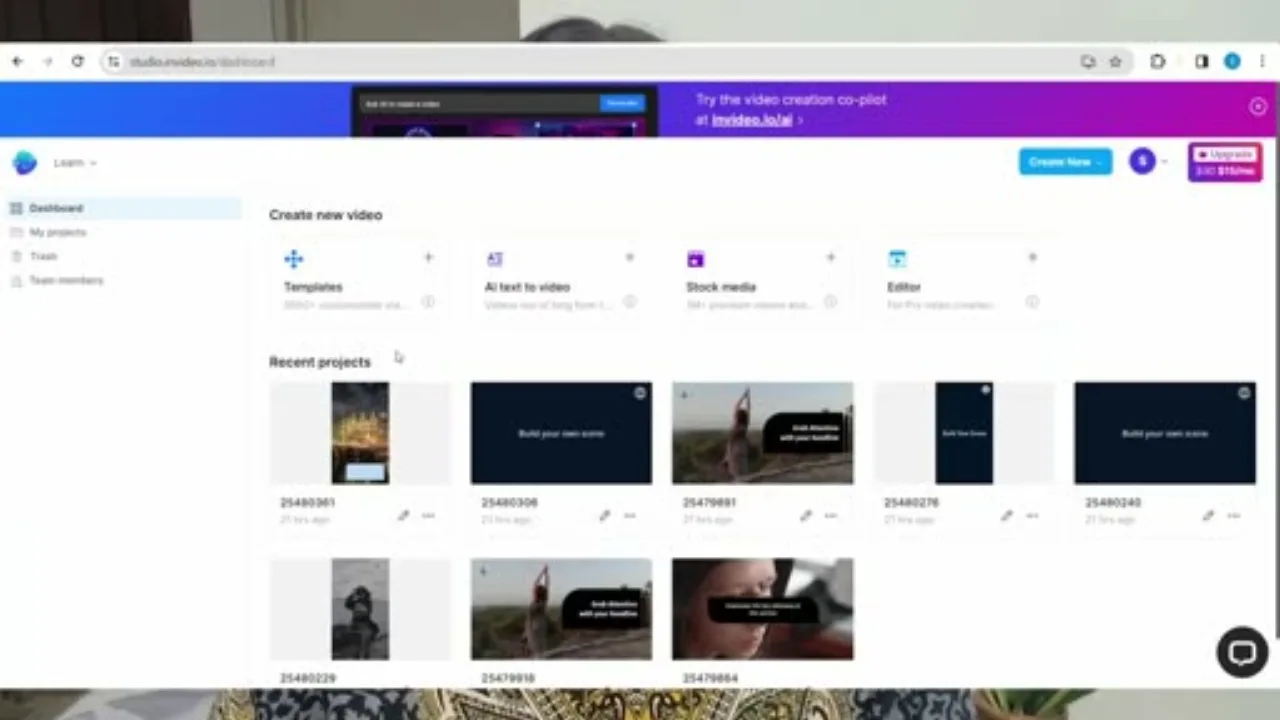
This is what the recent-projects list looks like inside a one-click generator: a row of thumbnails, each built from the same finite pool of stock templates, with no indicator of which shots were actually reviewed versus auto-selected. There’s no scene-level diff between projects — you’d have to open each one and watch it to know whether a fix actually landed.
What a creator shows you
Per-scene regeneration — change one scene without touching, re-billing, or silently overwriting the other 29.
What a generator hides
Often reruns the whole project on any script change, silently replacing frames you already reviewed and approved.
Narration and timing
Text-to-speech is table stakes now; almost every faceless video generator does it. What’s inconsistent is whether the tool measures the narration and times the visuals to it, or just slaps a fixed-duration image under whatever the voice track turns out to be. Get this wrong and you get the single most common tell of a mass-produced faceless video: a new shot appearing mid-sentence, or the same static image sitting on screen through three unrelated ideas because nothing tracked where the narration actually landed.
What a generator hides
A fixed-duration image sits under whatever the voice track turns out to be, with nothing tracking where narration actually landed.
What a creator shows you
Narration is measured, and shot length is driven by that measurement — a shot lands where the sentence lands.
Assembly — the step that decides if you can go back
This is the stage that most clearly separates a creator from a generator, because it’s the one where editability either survives or dies. A generator renders straight to a single mp4. If you want one change after that point, you’re not editing a video — you’re starting over and hoping the new run doesn’t introduce a different problem somewhere else.
A creator keeps every layer — script, storyboard, images, narration track — addressable after assembly, so a synchronized preview lets you catch a mismatch before you spend render minutes on it, and a fix touches only the layer that needs it.
What a creator shows you
Every layer stays addressable after assembly — a synced preview catches a mismatch before render minutes are spent.
What a generator hides
Renders straight to a single mp4; one change after that point means starting over and hoping nothing new breaks.
QA — who's actually checking the output
The last stage is the one almost nobody talks about: does anything check the finished video before it lands in your downloads, or is verification entirely on you? A rendered video can have gaps between shots, a narration track that runs past its last image, or a caption that’s out of sync — and a tool that renders and stops gives you no signal about which of those happened. You find out by watching the whole thing, the same QA pass a real editor would do by hand.
The tools worth using treat this as part of the pipeline, not an afterthought you’re responsible for catching yourself. If a faceless video creator is confident enough in its own assembly step, it should be able to tell you a render has zero timing gaps — not ask you to trust it.
What a generator hides
Renders and stops. A gap between shots, a narration track that outruns its last image — you find out by watching the whole thing yourself.
What a creator shows you
Verification is part of the pipeline — the tool can tell you a render has zero timing gaps, not ask you to trust it.
What the reviews of one-click tools actually say
The pattern shows up consistently once you look past the marketing pages. Buyer’s-guide roundups of faceless AI video generators in 2026 tend to converge on the same honest number: a realistic automation target is 70–80%, with a creator still spending real time — often 20 to 40 minutes per video — on the parts that decide whether it performs, not the parts a script can brute-force. Trustpilot reviews of several one-click faceless generators cluster around the same complaints: confusing interfaces, videos stuck mid-render, and users who felt the tool oversold what “one click” actually meant.
Agrollo Reviews ran a direct comparison of five of the category’s biggest names — Pictory, InVideo, Fliki, Synthesia, and Lumen5 — and the honest complaints line up with exactly this article’s thesis. None of these are marketing failures — they’re the visual-plan step (Stage 3) and the assembly step (Stage 6) showing up as user-facing pain because neither tool exposes them as something you can inspect before the render.
InVideo
Stock footage selection
“The ability to understand the script and select appropriate stock footage for video creation is not very accurate, which may require extra time to make relevant changes to the video clips.”
Fliki
Stock footage selection
“Stock footage selection for video creation based on the script is not very accurate” — fixing a mismatched clip means going back in by hand, not fixing the plan before it renders.
Lumen5
Talking-head customization
Dinged for having “fewer customization choices and no AI voice over” on its talking-head feature compared to the others.
That gap between the pitch and the experience is the whole argument for choosing a creator over a generator.
A policy risk, not just a workflow annoyance
YouTube renamed its “repetitious content” policy to “inauthentic content” in mid-2025 specifically to make explicit that mass-produced, formulaic content is ineligible for monetization — a direct shot at the template-and-regenerate pattern one-click tools encourage. If you’re aiming for the YouTube Partner Program’s long-form path — 1,000 subscribers and 4,000 watch hours in 12 months, per YouTube’s official eligibility page — a channel built entirely on unedited one-click output is working against the exact policy that decides whether you get paid.A prompt is a starting point, not a finished decision
None of this means automation is the problem. Research, scripting, image generation, and narration all benefit from AI doing the first pass — nobody wants to hand-write 30 image prompts for a 20-minute video. The problem is specifically when every one of those first passes becomes final the moment it’s generated, with no checkpoint where a human catches the thing the model got wrong.
The actual design question
At each of the seven stages above, can you see the intermediate output, and can you change it without paying to regenerate everything downstream? If the answer is no at more than one or two stages, you’re not using a faceless video creator — you’re using a faceless video generator that happens to let you type a prompt first.Creator vs. generator, stage by stage
| Production stage | Faceless video generator | Faceless video creator |
|---|---|---|
| 1. Research | Skipped — topic goes straight to script, gaps filled with statistically plausible guesses | A visible source pass before the script is written |
| 2. Script | One finished blob; one wrong line means regenerating everything | Sentence-addressable; a fix updates only what's downstream |
| 3. Visual plan | Invisible or skipped; the shot list surfaces already baked into the render | A storyboard you see before images generate |
| 4. Image generation | Often reruns the whole project, silently overwriting approved frames | Per-scene regeneration; approved frames stay untouched |
| 5. Narration & timing | Fixed-duration images under whatever the voice track turns out to be | Shot length driven by measured narration timing |
| 6. Assembly | Renders straight to one mp4; any change means starting over | Every layer stays addressable after assembly |
| 7. QA | Renders and stops; verification is entirely on you | Checks for timing gaps and sync issues before handoff |
Longform Studio is built around exactly this: source-backed research, a sentence-editable script, a visible storyboard, per-scene image regeneration, ElevenLabs narration with measured timing, and a synchronized preview before anything renders — plus a full production record of sources and costs, because “trust the model” isn’t a QA process. It’s built for long-form videos, 8 to 30 minutes, not shorts. If you’re deciding whether to start a channel at all, how to start a faceless YouTube channel and what a faceless YouTube channel actually is are the right places to look first; if you’ve already decided and are comparing tools, the best faceless AI video generators and how to make faceless YouTube videos go deeper on the comparison and the step-by-step, and long-form AI video generators covers the format question specifically.
FAQ
What's the difference between a faceless video creator and a faceless video generator?
A generator takes a prompt and hands you a finished, largely uneditable video — fixing anything means starting over. A creator exposes each stage — research, script, storyboard, images, narration, assembly — as something you can see and edit before the next stage builds on it, so one wrong sentence doesn't force a full regeneration.
Can a faceless YouTube video creator make long-form videos, not just shorts?
Yes, but check specifically — many tools marketed for “faceless video” are built and priced around 30-to-60-second shorts, with long-form as an afterthought. Long-form (8-30 minute) narrated videos need scene-level planning and sentence-anchored timing that short-form pipelines usually don't have.
Do one-click faceless video generators hurt monetization eligibility?
They can. YouTube renamed its “repetitious content” policy to “inauthentic content” in mid-2025 specifically to flag mass-produced, template-driven content as ineligible for monetization, regardless of how it was made. A channel built entirely on unreviewed one-click output is closer to that line than one where a person edited the script and checked the visuals.
How much editing does a faceless video creator actually save if I still have to review everything?
The saving isn't skipping review — it's not having to redo work that already passed review. A sentence-level script and per-scene image regeneration mean a fix touches only what changed; a one-click generator that reruns start-to-finish makes you re-review parts you'd already approved, which is where most of the wasted time and money in this category comes from.
What subscriber and watch-hour numbers do I need to monetize a faceless YouTube channel?
For long-form content, YouTube's Partner Program requires 1,000 subscribers and 4,000 valid public watch hours in the trailing 12 months, per YouTube's official eligibility criteria (see the callout above for the source link). There's a separate Shorts path — 1,000 subscribers and 10 million qualified Shorts views in 90 days — but the two thresholds don't combine.
Stop trusting a spinner with your video
This article walked through the seven stages between a prompt and a finished video and where one-click tools collapse them into a black box. Longform Studio keeps every one of those stages visible and editable — source-backed research, a sentence-level script, a storyboard, per-scene regeneration, and a synced preview before anything renders.
Start with Longform Studio$49/month plus real generation cost — no opaque credit balance.