
How to Make Faceless YouTube Videos (Full AI Workflow)
A step-by-step walkthrough of how to make faceless YouTube videos, from research prompt to finished export, using one real 10-minute example.
Key Takeaways
- A 10-minute video needs roughly 1,300–1,500 words of narration at 140–150 words per minute — write to that budget, not a guess.
- Lock one style paragraph and reuse it verbatim across all 15–20 images; that's what keeps a video from reading as a stock-photo grab bag instead of one production.
- Syrax's ElevenLabs shortcut: filter the voice library by accent, age bracket, and “high quality voices” before you audition anything — turns dozens of previews into a handful of real candidates.
- The whole workflow is $0-doable for one video, but ElevenLabs' 10,000-character free tier caps out around one 10-minute script a month — a ceiling, not a workflow.
- Budget 3–6 hours end to end the first time; under two hours once the style prompt and process are dialed in.
Ten minutes of finished narrated video. One topic, one script, one voice, one set of images, one render. That's the unit this guide covers — not a channel plan, not a niche pick, just the actual production of a single video from a blank page to an MP4 you could upload today.
Most guides on how to make faceless YouTube videos stop at a tool list: “use ChatGPT for the script, ElevenLabs for the voice, Midjourney for the images.” That's true and useless — it skips the part where you actually have to write prompts that produce something coherent, sequence them correctly, and stitch the output together without the audio drifting out of sync with the pictures by minute six. This walkthrough builds one real video end to end: a 10-minute explainer on “Why the Library of Alexandria Actually Burned” — a topic with enough disputed history to make research interesting and enough visual variety (scrolls, fire, ships, scholars) to test an image workflow properly. Swap the topic and the same three prompts below carry over.
Step 1: Pick a Topic a Script Can Actually Be Built On
Before any prompt, the topic needs to pass one test: can you find at least three credible, disagreeing sources on it? “History mystery” topics work because there's a real debate to summarize — was it Caesar's fire, the Muslim conquest three centuries later, or a slow bureaucratic death by neglect? A topic with no disagreement produces a script that's just a Wikipedia paraphrase with no narrative tension, which is the single most common reason faceless explainer channels feel flat.
Fascinating Horror (~1.45M subscribers) is the channel to study for this: it's built entirely on disputed or under-told historical incidents — disasters, disappearances, cover-ups — narrated over illustrated stills with no host on camera. The format works precisely because every episode has a genuine “what actually happened” tension baked into the topic choice, not added in editing.
Word budget for a 10-minute video
You need roughly 1,300–1,500 words of finished narration (people talk at about 140–150 words per minute for this kind of content). That 's enough depth to need real research, not enough to need a full production team.Step 2: The Research Prompt
Run this in ChatGPT, Claude, or whatever model you have access to. The goal isn't a script yet — it's a structured brief with facts you can verify, because an AI model will confidently invent a date or a name if you don't ask it to flag uncertainty.
Take the output and spot-check the load-bearing claims — the exact facts you'll say out loud — against an actual source (a museum page, an academic summary, a documented primary text) before they go in a script. This is the step people skip, and it's the step that gets a video community-noted or ratioed in the comments.
Step 3: The Script Prompt
A script prompt that just says “write a script about X” produces narration that reads like a listicle with transitions bolted on. Give the model structure, a target length, and a voice constraint:
Read it out loud before moving on
If you stumble on a sentence, the viewer's narrator will too. This is also the point where you decide the video's actual point of view — an AI draft with no take on which theory is most credible is the flattest, most forgettable version of this video, and it's the default output if you don't push back on the first draft.Step 4: The Image-Style Prompt
Faceless videos live or die on visual consistency — sixty images in sixty different art styles reads as slideshow chaos, not a produced video. Lock a style prompt once, then reuse its language for every image in the video instead of describing each shot from scratch:
Reuse the style paragraph verbatim across every shot and only change the “Scene” line. That's what keeps 15–20 images (roughly one every 30–40 seconds for a 10-minute video) feeling like one production instead of a stock-photo grab bag.
Step 5: Voice — Turning the Script into Narration
Paste the script into a text-to-speech tool, listen for two things: pacing (does it rush the hook or drag the middle section?) and pronunciation (historical names and Greek terms are where free TTS tools most often mispronounce and need a phonetic respelling in the source text). Break the script into the same [SCENE] chunks you marked in Step 3 — that's what lets you time images against specific sentences instead of guessing at timestamps in an editor.
Creator Syrax's full-workflow walkthrough follows the same research-to-assembly shape as this guide — ChatGPT for the script, ElevenLabs for narration, CapCut to assemble — which makes it a useful video to watch end to end alongside this guide's steps.
Source: How to start a faceless Youtube channel with AI [2026 FULL COURSE] by Syrax
Filter before you audition a single voice
One technique worth borrowing before you paste anything into a TTS tool: Syrax narrows ElevenLabs' voice library with its built-in filters — accent, age bracket, and the “high quality voices” toggle — rather than scrolling the default list and previewing dozens of voices by ear. For a 10-minute explainer, filtering to the accent and age range that matches your script's tone before you audition anything cuts the selection step down to a handful of real candidates, which isn't something this guide's Step 5 covers on its own.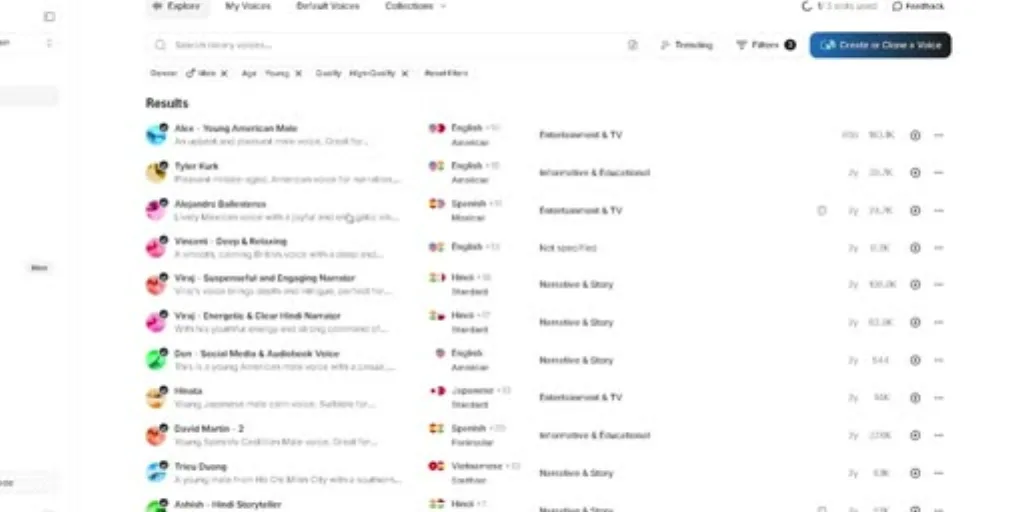
Step 6: Assembly
With narration and images in hand, assembly is the same routine on any timeline-based editor: drop each scene's image under its matching narration segment, add a 0.3–0.5 second crossfade between images so cuts don't feel jarring, add a simple lower-third caption if the platform supports burned-in text, and cut a 15-second version of the hook for a Short that points back at the long-form video. Export at 1080p minimum — 4K if your source images support it, since faceless channels have no face for the viewer's eye to anchor on, and soft or compressed backgrounds are more noticeable without one.
Check the disclosure rules before you upload
When you upload, check YouTube's altered-content disclosure rules: clearly stylized illustration doesn't require the disclosure checkbox, but realistic AI-generated depictions of real events or places do.Free vs. Paid: What Actually Caps Out
Everything above can be done at $0. Here's exactly where the free tier stops being enough, based on the actual published limits as of mid-2026.
| Stage | Free option | Where it caps out |
|---|---|---|
| Research + script | ChatGPT free tier | As of August 2026, OpenAI moved free-tier text chat to unlimited (retiring the old ~10-messages-per-5-hours cap), so drafting and revising a script is no longer rate-limited on text |
| Images | ChatGPT free image generation | Roughly 2–3 images per rolling 24-hour window on the free tier — a 15–20 image video takes a week of daily generation unless you upgrade or mix in a second free tool like Bing Image Creator |
| Images (alternate) | Bing Image Creator | Free “boost” credits (roughly 15) generate images fast in batches of four; once boosts run out, generation still works but slows to a couple of minutes per image |
| Voice | ElevenLabs free plan | 10,000 characters per month — about 1,500–1,800 words, meaning roughly one 10-minute video's worth of narration and nothing left over that month |
| Editing | CapCut / DaVinci Resolve free | Full timeline editing, crossfades, and captions are free; watermarks and 4K export are the usual paywall on the lighter mobile apps |
The honest read: a single video is genuinely achievable at $0 if you're patient with the image quota and stay under ElevenLabs' monthly character cap. What breaks the free workflow isn't any one tool — it's doing this weekly. A channel publishing consistently needs either a paid image tier, a paid voice tier, or both, and by the third video most people are re-typing the same style paragraph into a fourth browser tab and manually renaming forty image files to keep scenes in sync. That's the actual failure point of the free stack, not any single quota. Publishing itself is free from day one either way — ad revenue only starts once the channel clears the YouTube Partner Program thresholds.
This is also the gap a tool like Longform Studio exists to close — one workspace where the research, script, image style, and narration stay attached to the same project instead of living in five browser tabs, so changing one sentence in the script doesn't mean re-generating every image after it. It's built specifically for long-form (8–30 minute) videos like this one, not short-form content.
If this is your first video and you're still deciding on a channel, niche, and posting cadence rather than just this one production, that's a separate decision covered in how to start a faceless YouTube channel. For a broader look at where AI fits across the whole production stack rather than one script-to-voice pipeline, see how to make YouTube videos with AI. And if you want a rundown of dedicated faceless video tools beyond stitching free apps together yourself, this faceless YouTube video creator comparison covers what's actually built for this workflow.
FAQ
How long does it take to make one faceless YouTube video?
For a 10-minute video following this workflow, expect 3–6 hours end to end the first time: an hour on research and script drafting, an hour or two generating and reviewing images (longer if you're capped by free image quotas), 20–30 minutes on voice generation, and an hour on assembly and export. That drops to under two hours once the style prompt and process are dialed in.
How to create a faceless YouTube channel for free?
You can produce and publish a video at $0 using ChatGPT's free tier for research and script, Bing Image Creator or ChatGPT's free image quota for visuals, ElevenLabs' free 10,000-character monthly plan for narration, and CapCut or DaVinci Resolve for editing. The limiting factor is volume — free tiers cover one video comfortably per month, not a weekly upload schedule. Publishing is free from day one; ad revenue only starts once the channel clears the YouTube Partner Program thresholds.
Can ChatGPT actually generate a full YouTube script by itself?
It can produce a full first draft, but a single generic prompt produces generic narration. Feeding it a structured research brief first, then a script prompt with explicit pacing, length, and voice rules, produces a materially better draft — and every draft still needs a human pass for fact-checking and to cut the flattest sentences.
Do faceless videos need real human narration to feel authentic?
No — AI voice tools like ElevenLabs are widely used and increasingly hard to distinguish from a human read, especially at natural pacing with good punctuation cues in the source script. What actually signals "AI slop" to viewers is inconsistent visual style and a script with no point of view, not the voice itself.
What's the best free AI tool for faceless YouTube video images?
Bing Image Creator and ChatGPT's built-in image generation are the two realistic free options in 2026. Bing gives faster batches via free daily/weekly boost credits; ChatGPT's free tier is capped around 2–3 images per day. Neither is unlimited, so budget a few days if you need 15–20 consistent images for one video.
Stop re-typing the same style paragraph into a fourth tab
This guide's actual failure point isn't any single free-tier cap — it's doing the research, script, image style, and voice by hand every single video. Longform Studio keeps all four attached to one project, so editing a sentence regenerates one scene, not the other nineteen.
Try Longform StudioBuilt for the 8–30 minute long-form format this guide's example uses.